You are (probably) using your environments wrong
I am using it the wrong way too. In fact, most developers are. Agile teams know four environments (DEV, TST, UAT, PRD) in their application cycle, and this causes problems you probably have, but didn’t notice before. Let me show you how you can identify these problems, and how you can solve them.

- Fernando CrozettaSenior Software Developer Engineer
Wait, do I have a problem with my environments?
You have set up your pipelines to deploy to each stage correctly, so when DEV is deployed, the service is also updated accordingly. Everything works perfectly for all four environments. So how can a problem exist here? Imagine your customer wants to test the application but not in a production environment, and they request your help to achieve this. You take a look into all available environments, and one by one, you realize this cannot be done without a workaround.
DEV and TST cannot be used, since they are constantly changing, and do not reflect the production application. UAT cannot be used as well, since it may contain the major breaking changes, the team has been working on for the past month, while the customer wants to test against the version of the application currently in production. PRD also cannot be used, because the customer does not want the test data in the same environment as their production data.
You may think that creating a dedicated PRD account solely for testing purposes will solve the issue. But remember that the analytical processes running in the background will now include the data generated by this PRD account alongside the real data from actual accounts. Which will start to yield misleading insights. So definitely no production stages.
If this sounds like your team, you are not alone. In these situations, there is no good solution, and the usual approach is to give the customer access to UAT, and kindly remind the customer this will not match production. You may have done this as well.
The question is: is there a solution to this mess?
Understanding DTAP
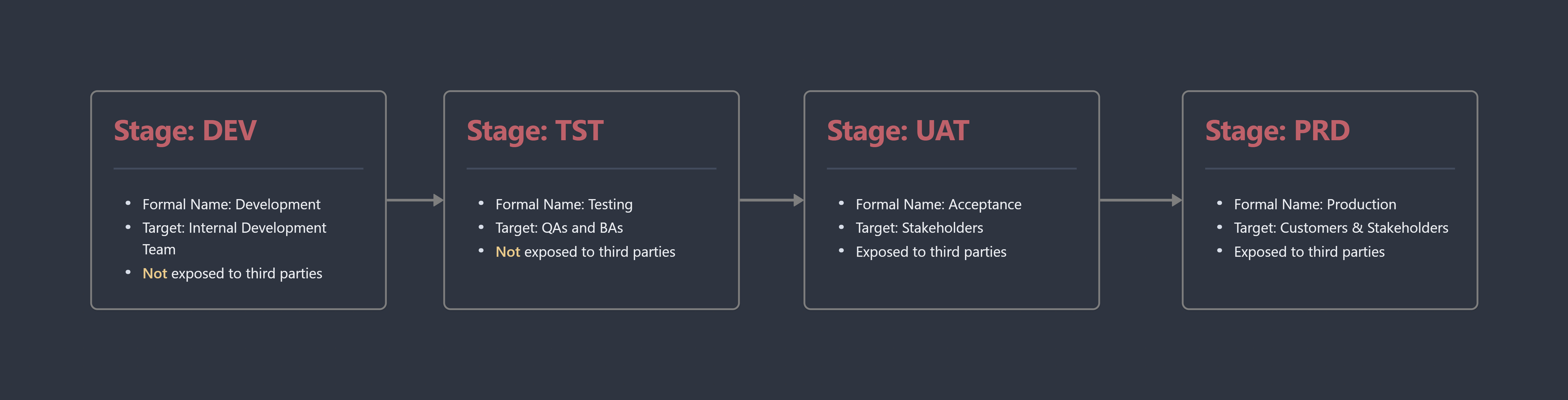
DTAP (Development, Testing, Acceptance, Production) is the name used for the stage separation commonly used in agile methodologies. Each one has a defined target audience, and purpose of existence. Understanding each one is key to solving your problem.
Starting with DEV; This environment is targeted for the development team and is used to synchronize the features added by each member of the team. Here, your team will run unit and integration tests, and build images and artifacts when necessary.
Following DEV, we have TST, which is used mostly for Quality Assurance and Business Analysts. In this stage, having an application running start to end is a given, and ideally the application could be fully tested internally and audited to make sure the implementation matches the requirements of the business analysts and stakeholders.
Next, we have UAT, also known as Acceptance. It is important to notice that UAT is the first environment exposed to stakeholders, and specific groups that will validate the given requirements were met. In this stage, the development team can also monitor the usage of the application to refine and improve the tests done in previous stages.
Lastly, we arrive at PRD, the second stage open to customers and stakeholders. It is the stage that will be used in real world scenarios. Most teams will not have access to production data, and the logs should not contain any personal or identifiable information.
The missing environment
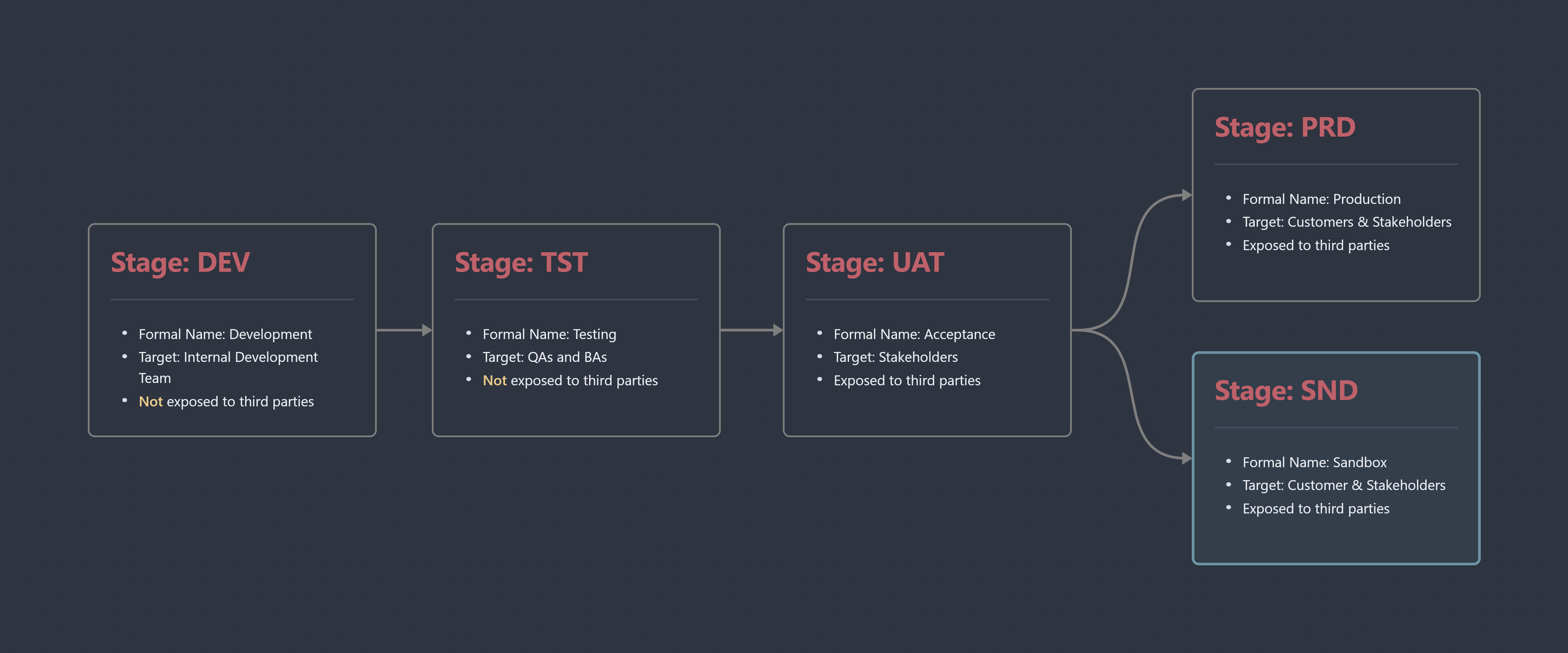
To solve your issue, we added a new environment named sandbox (SND). This environment always mirrors the production environment, allowing stakeholders, customers, and external parties to test and connect to the application in a safe manner. Nothing from this environment should connect to any production services, and the data is never mixed. This is the third environment exposed to external parties and stakeholders.
There is a misconception that your stages should match other teams’ stages. This is absolutely wrong. You should not have access to other teams’ DEV and TST stages, and they should not have access to yours.
When you are the consumer of a service, you have three environments to connect to:
- UAT for features not yet released by the third party
- SND for features already released by the third party
- PRD for production features
When the roles are inverted and your team is a provider of a service, the three options above are the ones you should make available for other teams.
What to look for when implementing a sandbox environment
There are multiple ways to implement a sandbox environment, and you should tailor it to your team specific needs and workflow, but some things apply to all teams:
- A new deployment to production must cause a new deployment to sandbox.
- A rollback in production must cause a rollback in sandbox.
- The deployment process for production and sandbox should be the same.
- From the consumer perspective, sandbox should behave the same as production.
- Sandbox does not have versioning for itself but uses and mirrors production versioning. This also applies for possible artifacts in your pipeline as well.
Ideally, the sandbox trigger should be automated to run either in parallel or right after the production stage if the production stage successfully ran. The implementation of this trigger must be adapted to follow the already existing workflow. Some ideas on how to implement a trigger that will deploy the sandbox environment:
If you are using GitHub actions, one possibility would be to use Webhook events.
If you are using Azure pipelines, you may configure a pipeline resource trigger.
If your deployment is still manual, you can add the steps for the SND deployment as part of the regular production deployment.
So, it was just adding a new environment?
It may seem really simple to “just add a new environment”, but there are some deep implications for this approach. First, your team must understand and change their view on how the environments are used, deployed and maintained. Secondly, adding the environment may increase the cost of your infrastructure, considering you need to add more resources and services. And finally, you may need to notify your customers and other teams about this change, and which changes must be made on their side as well.
You've got to think about the big things while you're doing the small things so that all the small things go in the right direction."