Template specs: The hidden gem to enable DevOps for Bicep
Template specs, those sparkling resources that you can create in Azure. And yes, they are actually a resource type that “lives” in an Azure resource group. Template specs allow you to store Azure Resource Manager (ARM) templates for later usages. This does not only help you, but your organization can leverage template specs to simplify their deployments through a shared resource group.
It opens a whole new door on deploying Azure resources, whether it is through the Azure Portal itself, through the Azure CLI, using Azure Powershell or even a DevOps pipeline. But why the title “the hidden gem”? You are going to learn all about it in this blog post. Particularly how you can leverage template specs for the Bicep code you write and enable DevOps for them.

- Gijs ReijnCloud Engineer
The benefits of template specs
Undoubtedly, you might already be familiar with template specs if you scattered the internet and found some benefits as to why you should use them. However, let us list some of the great benefits of using them.
- You can version template specs
- You can leverage Azure Role-Based Access Control (RBAC)
- You can add release notes
- You can integrate template specs in a DevOps pipeline
Check out the example below that creates a new Template Spec by using Azure Powershell.
Or the equivalent variant in Azure CLI.
If you have an available Azure Subscription, and you have run the above command with a template file (in this case a storage account), you will see that the information is included in the resource with the version.
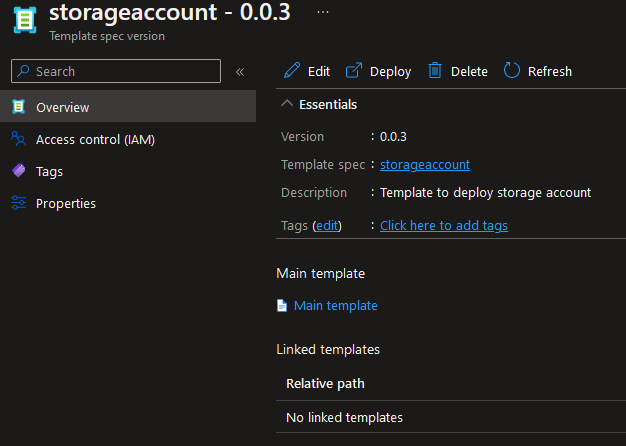
With this information at hand, you should see that it comes in handy for the enablement of DevOps. Let’s dive a bit deeper into enabling DevOps for template specs.
Enabling DevOps for template specs
So, you might already have a bunch of modules created with Bicep. These modules are converted to ARM (JSON) templates and shared with your users by means of a repository or storage account. This immediately compromises how your users leverage your templates, as they can simply create local copies and modify them, instead of looking at how you can enable template specs for your organization in a secure and compliant way. Depending how big your team is, or that you are that lone warrior that develops Bicep code, let’s see how such design can look like.
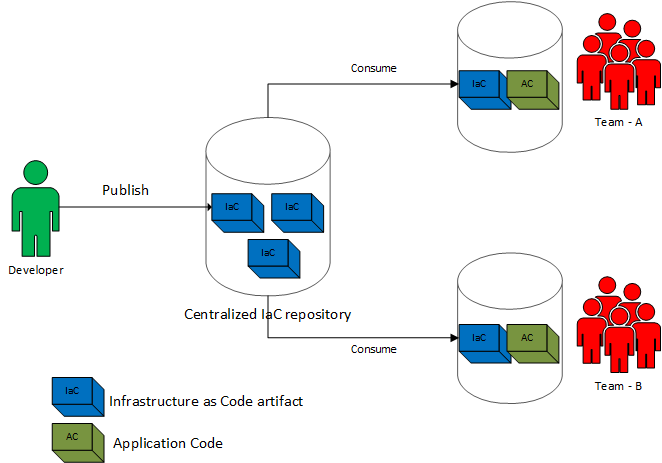
As you can see from the above design, you are publishing template specs that are built from your Bicep modules that can be consumed by your end users to deploy Azure resources. Teams themselves can consume the required Infrastructure as Code components they need to run their application. In this way, you are helping your teams to build in automation, traceability and reduce the cognitive overhead on deploying their own resources. It can also restrict the deployment of IaC components only to go through a CI/CD tool, for example Azure DevOps. Since Azure DevOps uses a Service Connection by means of either a Service Principal (SPN) or Managed Identity, it becomes easy to grant the required access to read and write a template spec in Azure. If you expand the design a bit further, you can introduce multiple stages to build in the mandatory quality checks when developing your Bicep code. You can even introduce one development stage where your fellow colleagues can introduce experimental templates. Such flow is shown in the image below, and if you have followed the Bicep series, it should look quite familiar to you.

With this approach, they can test out the deployment process from their local environment when they are creating Bicep modules and get the required feedback. You can give the freedom to publish template specs without using a DevOps pipeline, as template specs allow you to give those fine-grained permissions with built-in roles.
Design Bicep modules
When you are designing your modules, there is always a balance between the lifecycle of your resources that you want to deploy. Are you going to group all resources together and include them in one template spec (or module)? Are you going to build it more modularized? Or are you going to use conditional statements to enable certain pieces when a particular resource must be deployed? These are some tough questions, but let’s shed some light on it by illustrating an example. Let’s imagine you created a module to deploy an Azure Automation Account. The following code snippet is a simple Azure Automation Account.
In this case, it helps you with two things. First, it is not mandatory to give Template Spec Contributor to your so called “Power Users”. It allows them to quickly create template specs, test them and if they don’t work, delete them. If you have a policy that everything needs to go through a DevOps pipeline, even to development, then it would be sufficient to grant the Template Spec Reader role. Now that you have a clear path to publish your modules, what about the design of Bicep modules?
Then the module that you can expose as template spec.
Now comes in the requirement to use Update Management through the Automation Account. This would require three things:
- A new Log Analytics workspace
- A linked service resource type
- A operation solution resource type
You can do multiple things to satisfy the requirement. Let’s list some of them.
- You can create a new module calling it automation-account-including-la that deploys Log Analytics with the other resource types
- You can create a new module that deploys Log Analytics first and retrieve the output from it to support chaining
If you go for option two, you will need to define output values in the Bicep module file that outputs the required values to deploy the operation solution and linked service. Such Bicep module would look like the below code snippet.
The below image shows the simple flow when the resources gets deployed.
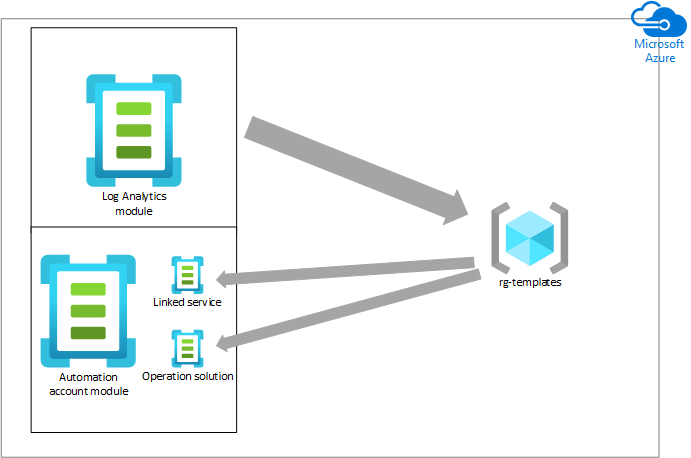
There is no right or wrong in both approaches. When it comes to maintainability of your modules, modularizing has the benefit if you change it in one location, all the modules instantly get updated with the new changes. This might sound scary in the first place, but by now you should know template specs are versioned. When teams are consuming template specs including the version, it will not break with your change. When the team wants to check out the latest version, they can slowly move towards it. Since you have the ability to specify release notes in your template spec, you can inform your consumers upfront. When you also have the comprehensive test suite in-place before publishing the template spec to production, it will catch these changes also.
Now that you’ve learned about designing Bicep modules, let’s look under the covers and see how you can leverage a DevOps pipeline that you can expose to your consumers through Azure DevOps.
Deploy template specs through Azure DevOps
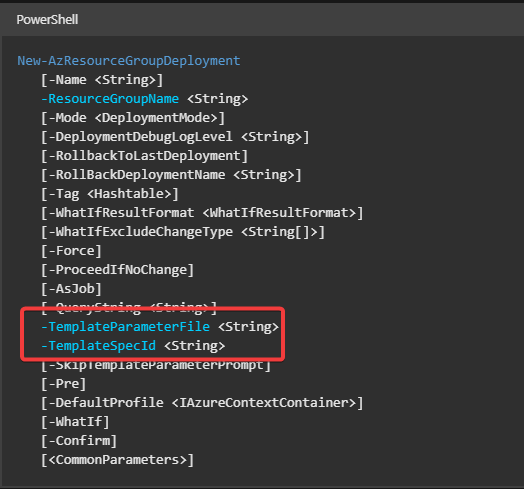
Azure DevOps natively does not have a task that can deploy template specs. Luckily, you have other tools in your arsenal that can deploy template specs. Two of these tools are the Azure CLI or Azure Powershell. These tasks come with Azure DevOps out of the box. When you look closely to the documentation to deploy resources against Azure, the New-AzResourceGroupDeployment cmdlet supports specifying a “TemplateSpecId” and “TemplateParameterFile”.
Equally, the az deployment group create supports the same.
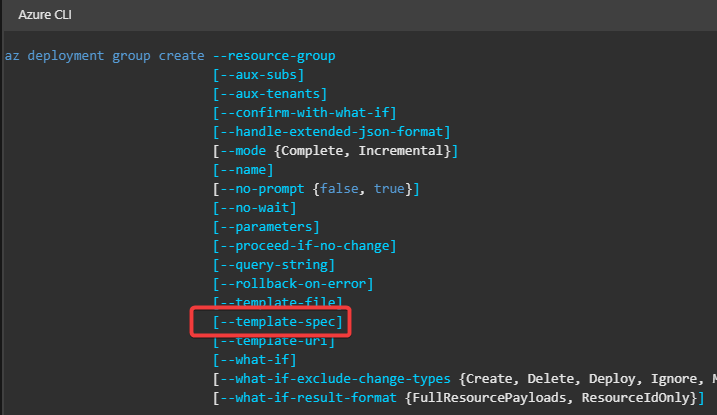
There are also different options to specify the required parameters to deploy the template spec.
- Use inline parameters to deployment cmdlet
- Use hash tables in Powershell to pass it as TemplateParameterObject
- Use the parameter file
- Use the LoadTextContent with a JSON config file
It’s really up to you or your team what feels the most comfortable. Each option has its pros and cons on usages. Having said that, you can wrap around logic and expose it as a YAML template to be consumed by your consumers within Azure DevOps. An image always says a thousand words.
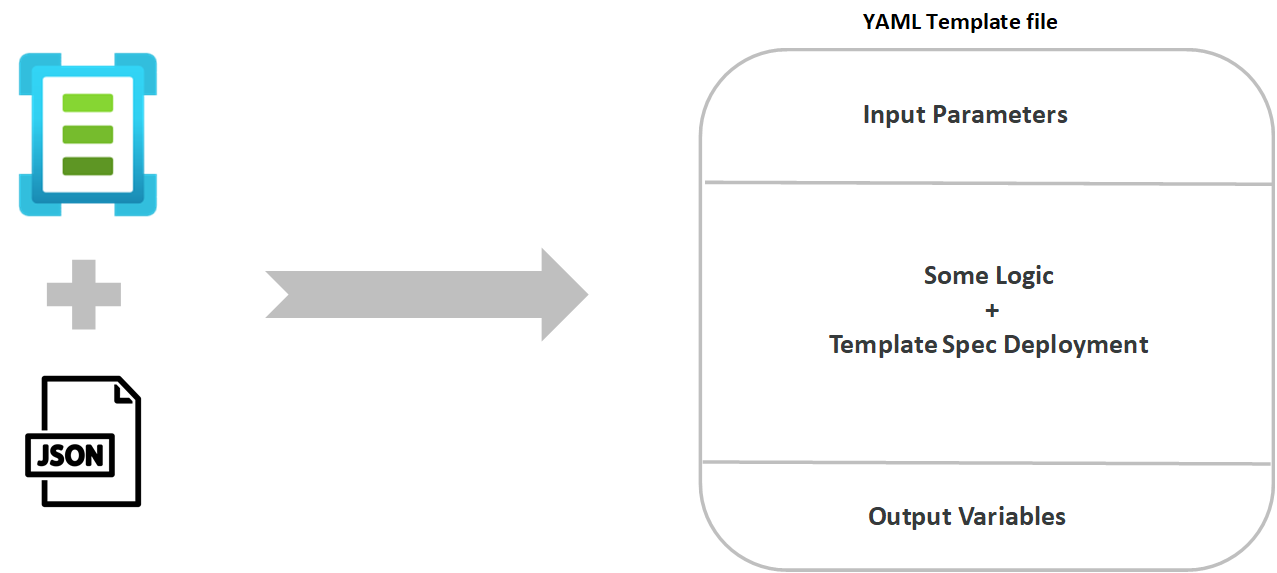
In a high overview, you can provide clear examples of how your template specs can be consumed through Azure DevOps.
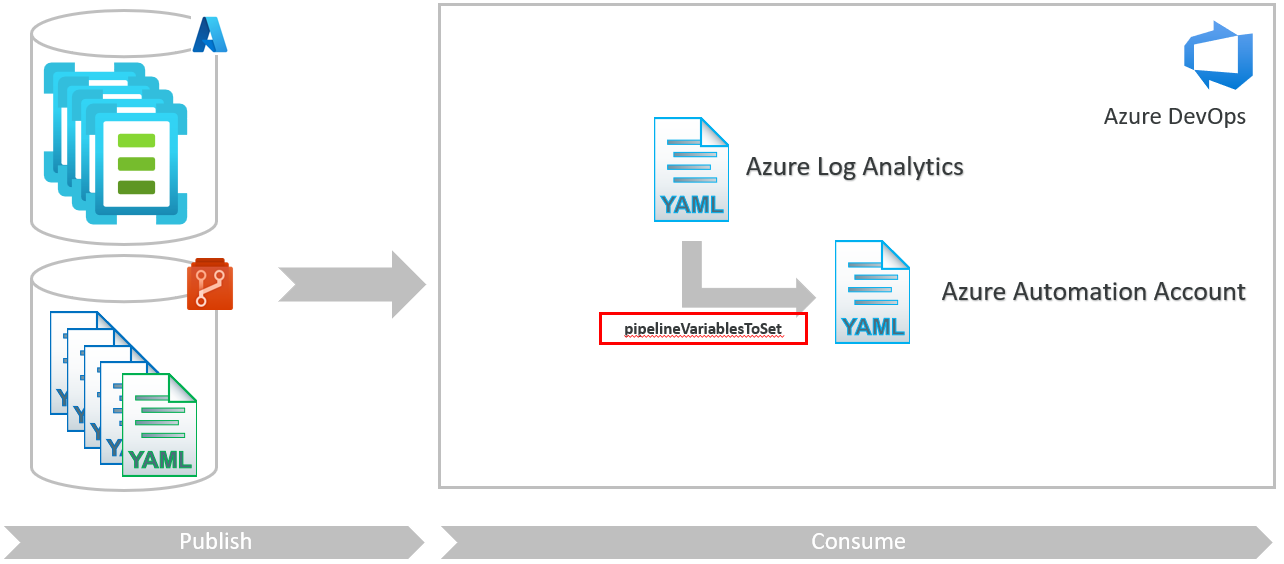
These examples can be easily stored in a repository that is publicly available within your organization.
Document Bicep modules
Documentation can be a cumbersome task to do. Even if you can provide clear examples based on the templates you create, you still want your consumers to find out what the override parameters can be and what the module actually deploys. If you are familiar with the Azure Quickstart Templates, you know they always come with some form of documentation. Take for example how Microsoft documented the Azure Automation Account deployment.
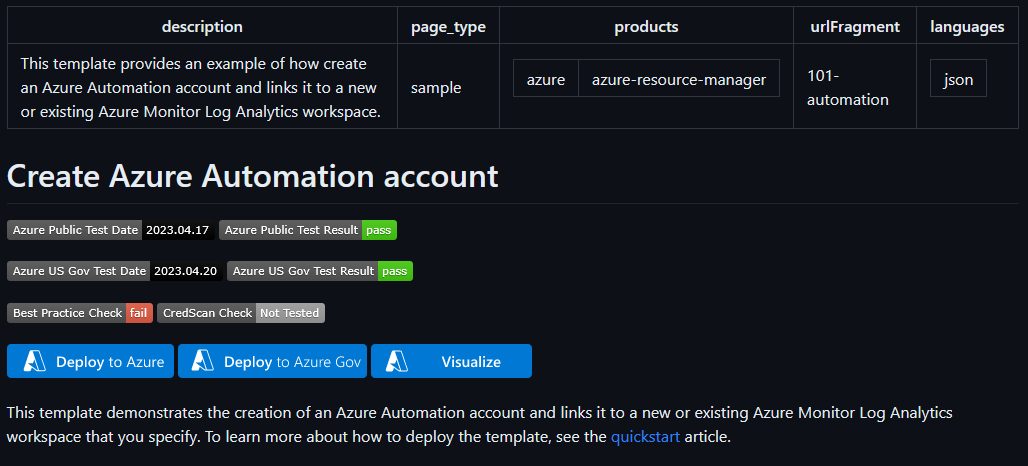
How can you make your life easier and generate documentation on the fly when you develop a Bicep module? Enter the world of PSDocs, a Powershell module that can generate markdown from objects using Powershell syntax.
PSDocs allows you to define a document, which internally provides a set of instructions on how PSDocs should render that object. Since it is a specialized task to document your IaC artifacts (the raw JSON format), there is an additional module that helps you define that abstract document more easily. Enter PSDocs.Azure, a module that generates markdown from Azure IaC artifacts. You can install the module from a Powershell terminal session by running:
To generate a document, you use the Invoke-PSDocument cmdlet. When you run Invoke-PSDocument against the flat JSON file that is produced when you build the Bicep module, it produces a README file as shown in the image below
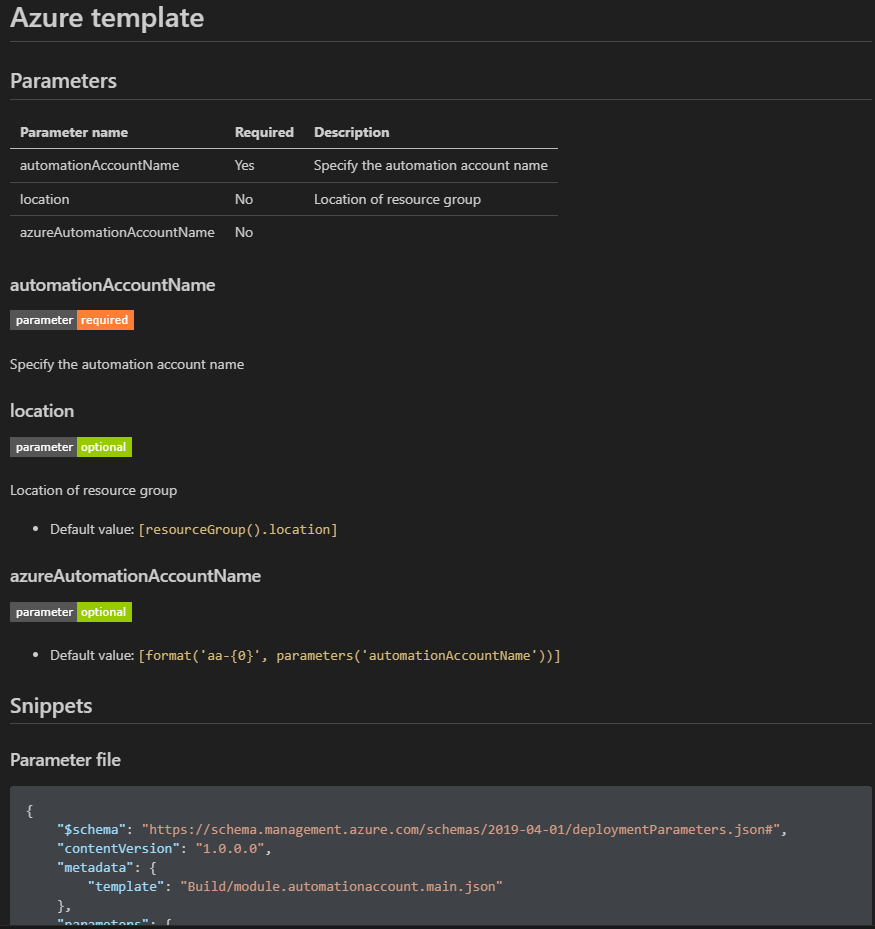
The PSDocs.Azure module searches automatically for a metadata file called metadata.json. This metadata and the template structure itself can then be used to dynamically generate documentation. Take for example the code snippet below for the Azure Automation Account.
When you run Invoke-PSDocument -Module PSDocs.Azure -OutputPath out/docs -InputObject automationaccount.json, it automatically builds up the header with description.
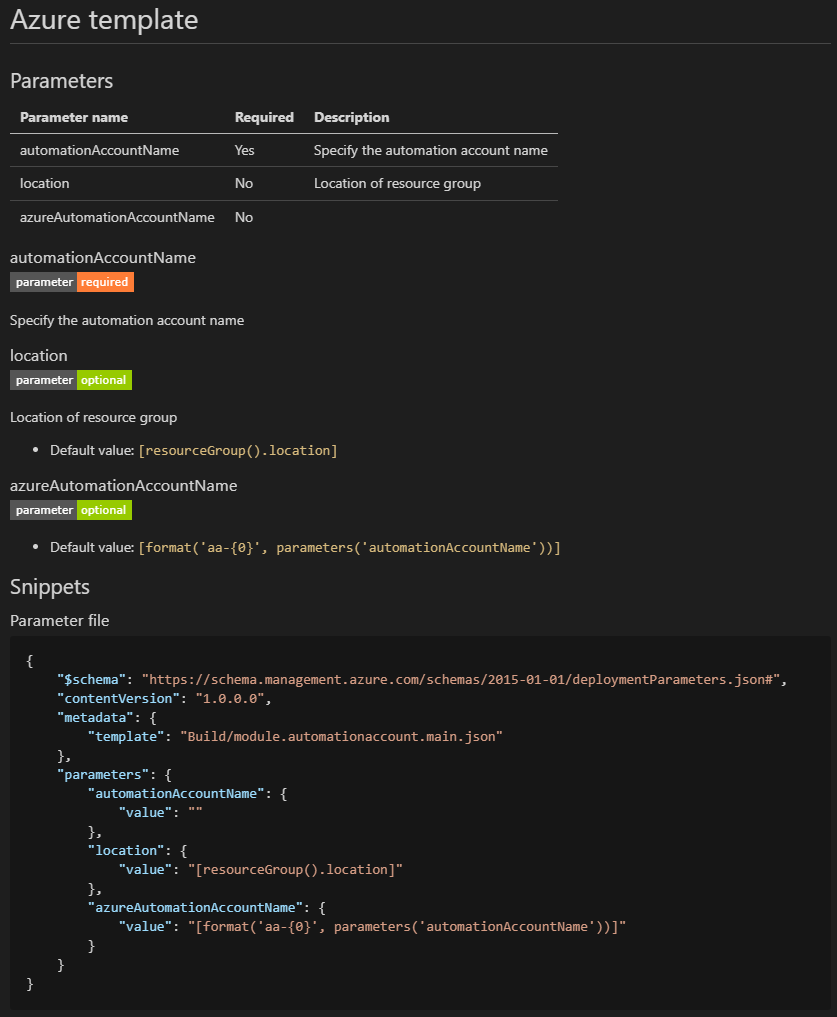
This is extremely useful when you are developing your Bicep modules. It helps you to think about what descriptions and metadata decorators can already be added to your parameters. This way, it becomes easy for you to document the published templates in an automated and standardized fashion. It also allows you to:
- Keep your documentation in sync
- Allows to be reviewed in a pull request
- Store the markdown in the same repository as your Bicep module
How more information you provide upfront in your Bicep module, how easier it becomes to generate documentation later as you can see!
Conclusion
Template specs have been around a while now, but as you have learned, you can make optimal use of it in combination with Bicep modules and a DevOps pipeline. Whether you are working in a small team, or want to publish template specs in your organization, they easily allow you to scale for consumption. With all the nitty gritty features both Azure and Azure DevOps provide, you can create quality Bicep code that is converted to a versioned template spec. Your consumers can leverage a DevOps pipeline based on a YAML template and make their lives a bit easier when they deploy their required Azure resources in a compliant manner.
A special thanks
Thanks to my colleagues Lars Soek, Jurjen Oskam and Ivo Doeff in designing and building this solution, especially on the amazing flow designs.
References