Signing digital messages with Elliptic Curve Digital Signature Algorithm (ECDSA)
When exchanging data between public services or databases, verifying the authenticity of digital messages, or documents, is a critical step in the protection of our data quality. Digital signatures secure environments that are vulnerable to attacks which forge malicious messages. Within Rabobank, we use cryptographic digital signatures to validate the authenticity of digital messages and its sender to ensure the integrity of our data is kept up to the highest possible standards.

- Erwin MandersSolution Architect
Public key cryptography and public key pairs
Elliptic Curve Digital Signature Algorithm (ECDSA) uses Elliptic Curve Cryptography (ECC) to generate a public-key pair. With public-key cryptography, a sender can create a digital signature of a message with their private key, and the recipient can verify its authenticity with the public key. The public key can always verify if the message came from a known sender, but only the private key can create message signatures. Together, the public-key pair represents a mathematical algorithm with a specific bitesize that defines its length.
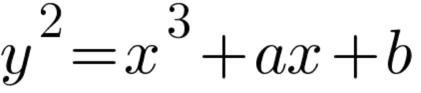
The elliptic curve group
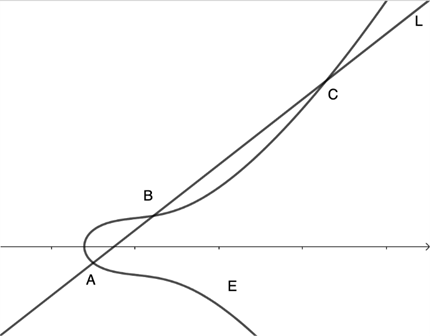
The elliptic curve is a unique function where any two points (A and B) on the curve (E) can be connected by a straight line (L). A third point C can be found either intercepting the elliptic curve or at infinity. We can invert C and find its dot function on the curve (-C) so that A+B=-C. For L in which C exists at infinity, A+B = 0. This is called an elliptic curve group.
Calculating the public key pair and signature
We can define another curve group between B and –C to find another value of A. We then apply this encryption function a random number of times (k) to generate our public key. The random point A is our private key and since only the private key holder knows the random number k, the private key cannot be constructed from the public key.
Now that we have our private and public key pair, we can create a signature for a message (m). The signature is created using the pair (r,s) in which r represents the public key, which is the modulus N (bit-size) of the x-coordinate

s represents the hash of m as h and the private key as pr:

Note that r and s as well as h are all limited by the bit-size N of the private key
The verification process requires the receiver of the message to know the public key curve point P.
For the private part of the signature


If we substitute the value of c and s, we find that u1 is the private key multiplied by the random integer k

This part of the signature verifies that the signer knows the private key
For the public part of the signature

Once again substitute c and s, we find that u2 is r multiplied by k
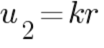
The signature is valid if the public key r is equal to the x-coordinate of the curve-point (u1, u2)
Creating or importing ECC certificates
We use Nimbus Library to create a Json Web Signature according to RFC7515. However, we will need to convert our private key into PKCS12 certificates before using it in our Java application.
First, we must create an ECC key with the OpenSSL command tool. Since secp256k1 is not supported by Nimbus, we use the secp521r1 curve. For this exercise we use openssl to create a keypair and keep the private key on disk and in memory. This is not very secure. When used for more serious applications in production, use a key vault or hardware security module instead.
> openssl ecparam –name secp521r1 –genkey –noout –out key.pem
We then sign to create an x509 certificate
> openssl req –new –key key.pem -x509 –nodes –days 365 –out crt.pem
Convert the x509 certificate to PKCS12 format
> openssl pkcs12 –export –name secp521r1 –out keystore.p12 -inkey key.pem -in crt.pem
The certificate we created has a digital fingerprint that looks something like this:
Certificate fingerprints:
SHA256: 0F:F9:7C:9F:5E:44:8C:64:1B:13:7D:70:F9:9F:71:0C:B1:96:33:D6:F3:0F:23:00:59:CB:4B:0B:2C:FD:93:C2
Signature algorithm name:
SHA512withECDSA Subject Public Key Algorithm: 521-bit EC (secp521r1) key
Using ECDSA Signer in Kotlin
We now have a usable java keystore that we can use in a FileInputStream to create an instance of KeyStore
In our example, the object we create is an RFC-7515 JWS object, using an ECDSA signer to sign a message
The generated JWS object looks like
eyJraWQiOiIxIiwiYWxnIjoiRVM1MTIifQ.QSBzaWduZWQgbWVzc2FnZQ.AVbYOg2YwrIrhbMxqDPs_icXSocPTJKpcjO5sH6wM7mgoFMYp_G3yggVZ8X4o44QsboWiIvyariS_Dvl4EGO4yGlAf9YIPCMkXrRA_BRFdEjuRz5Py8qkorydpo9Jz-WzVvGqVwcTY6eszrlLqMyQ9GcV-D0u5iS4mr9NktkJlW2vSGZ
We can verify the JWS object using the ECDSA verifier
The verify function fails if the signature does not match the message payload and the public key, or if the signature is not valid.
Done! We have verified the signature created by the private key holder using the public key and can confirm that the message is authentic.
Disclaimer: ECDSA is known to be vulnerable to post-quantum attacks. For Quantum-Resistant Digital Signatures in Java, see https://openjdk.org/jeps/497