Building reliable GenAI applications with GraphRAG
GenAI has changed how we interact with information—chatting with tools like ChatGPT or Copilot feels almost magical. But when your questions involve internal context like customer relationships, team responsibilities, or company-specific interpretations, LLMs fall short because they’re trained on public data. The solution? Retrieval-Augmented Generation (RAG). In this post, we’ll explore how RAG, and specifically GraphRAG, can make GenAI applications accurate, explainable, and context-aware.

- Colin van LieshoutIT Architect

Retrieval Augmented Generation (RAG) to the rescue
To solve the described challenge of lacking internal context, we can leverage Retrieval-Augmented Generation (RAG). In short, RAG means that we connect a Large Language Model to a Rabobank internal knowledge base. This way you can still ask your question to the LLM, but it is able to leverage internal data for generating a response.
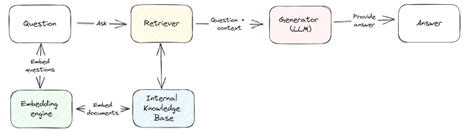
"Traditionally", (we are always quick to use this term in the Data & AI space), RAG solutions use a vector database. This means that (parts of) documents are embedded into a vector space using an embedding engine. Questions asked by users are embedded similarly and the vectors are compared to each other to find the most relevant chunks to provide to the Generator as context.
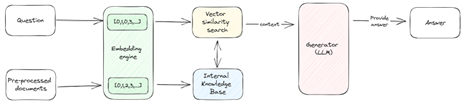
Note that finetuning an LLM on new tasks or data is technically also possible, but this is very expensive and success is uncertain.
The limits of Vector-based RAG
While Traditional RAG works great for certain use cases, there are some limitations. Imagine the following scenario:
A customer asks, “Why was I charged a €4.50 fee plus a 2% exchange rate surcharge for a credit card payment in Belgium, and how can I dispute it?”
You may encounter limitations using traditional RAG, such as:
- Loss of Structural Relationships: Vector RAG may retrieve fee tables and Euro (SEPA) zone info, but it won't connect that Belgium uses euros and that fees then typically don't apply. It misses how these concepts relate structurally.
- Limited Multi-Hop Reasoning: Answering requires reasoning across multiple steps: identifying the transaction currency, checking card policy, and determining if the fee was misapplied. Vector search can’t chain these steps.
- Poor Explainability: Even if relevant documents are retrieved, the system can’t explain why they were selected or how they justify the fee. This makes it hard for the customer to trust the response or for the bank to audit it.
This article discusses how Knowledge Graphs can helps in tackling these challenges, and what steps we should take in order to get there.
How Knowledge Graphs can complete the artificial brain
While vector search is powerful, it may not be enough for certain usecases. In the world of Artificial Intelligence-powered knowledge systems, LLMs are like the right brain. Intuitive, associative, and great at understanding language. It uses vector similarity to find relevant chunks of text and generate fluent responses. But it lacks structure, logic, and reasoning. This is complemented by GraphRAG bringing in the left brain. Analytical, structured, and relational. It uses a knowledge graph (a representation of information that emphasises the relationships between entities) to understand how concepts are connected, enabling deeper reasoning and explainability. Linking it to the question above:
- Structural Relationships: A knowledge graph can connect entities like Customers, Transactions or Card policies with their properties in mind. GraphRAG understands that the Transaction's location and currency should exempt the transaction from fees, enabling a context-aware answer.
- Multi-Hop Reasoning: GraphRAG supports traversing relationships in the graph. It can follow a path from the transaction to the card’s terms, and to dispute procedures—producing a logical, step-by-step answer.
- Explainability: GraphRAG can trace its reasoning path through the graph. This provides clear, auditable explanations that build trust and meet compliance needs.
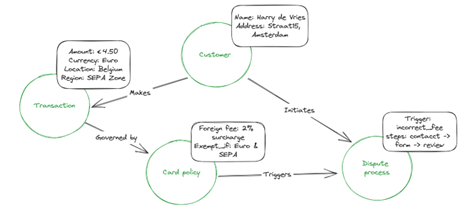
Building a GenAI-ready Knowledge Graph
That of course sounds very promising, but then the question is, how do we even prepare a graph to unlock such power? Knowledge Graphs are typically built using structured data and you can perfectly start connecting LLMs to that to get your first GraphRAG value.
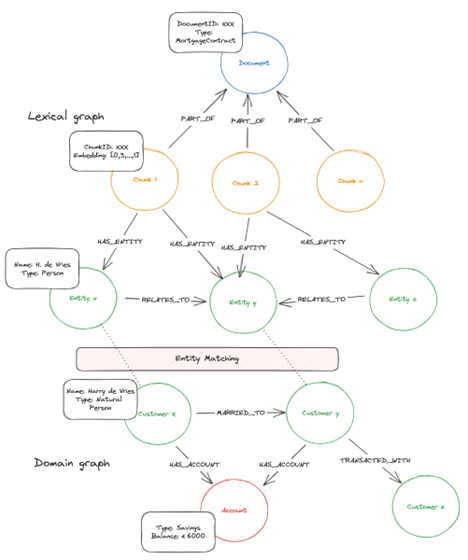
In most organizations, however, valuable knowledge is buried in unstructured content. Documents, emails, wiki pages, PDFs, and more (such as would be the case for the Card policy or Dispute process in the example above). To unlock this knowledge for GraphRAG, we need to transform this to a suitable format before adding it to a graph database. A graph that represents semantic structure of a document (relationships between texts) can be referred to as a Lexical graph. Whereas a graph that represents concepts and entities of a domain and their semantic or functional relationships, can be referred to as a Domain Graph. Some steps to preparing data for a Lexical graph are:
- Document chunking; to allow LLMs to process large documents efficiently, we can split them into smaller, semantically meaningful chunks (e.g. paragraphs)
- (Structured) Data Extraction: Extract structured data (entities, relationships, properties) from the documents using Natural Language Processing techniques such as:
- Named Entity Recognition (identify concepts as customers, products)
- Topic Modeling (identify topic of some text)
- Entity matching (determine if two entities refer to the same real-world thing)
- Embedding: We represent each chunk in a way that captures its meaning, by converting it into a vector embedding. Embeddings can also be used to create edges based on semantic similarity.
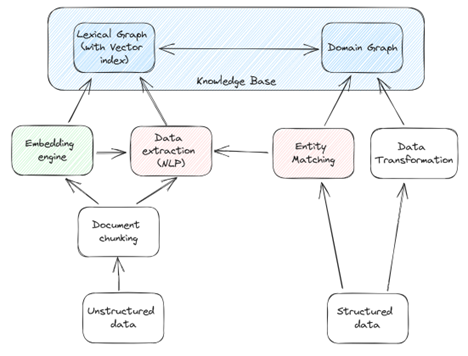
Leveraging the detected concepts (structured data) we can also bridge the Lexical and Domain graphs together to complete the Knowledge Base for GraphRAG. Below displays what a graph-based internal knowledge base could look like, combining the unstructured data in the Lexical graph with the structured data of the domain graph through entity recognition and entity matching.
Context Engineering: Getting the right data out of the graph
To answer complex questions effectively, GraphRAG must retrieve the most relevant and structured context from the knowledge base graph. One approach is Text2Query, which translates natural language queries into the query language of choice to extract subgraphs. While a useful starting point, it may not always result in the desired quality of answers, as it is limited by its dependency on schema knowledge and ambiguity of user input. A more reliable method is, for example, Dynamic Query Generation . Here we pre-define query templates with placeholders (e.g. $customerName), which we for example provide as prompt or store in a Template Store such that they can be used by the LLM as Tools. The LLM can then:
- Identify which template (or Tool) best fits the intend of the user
- Fill in parameters from the user’s question
- Execute the query
- Use the result as context to answer the question
For more complex tasks, multiple templates can be chained, making a step towards agentic behaviour (section 2.4). Of course we cannot expect to directly have templates for the whole range of questions that a user might ask. Therefore, while growing your Template Store, you can still use an open setup like Text2Query as a fallback mechanism.
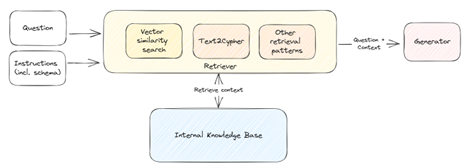
Graph traversal generated context can either be combined with the vector results, or the vector results can serve as input to the graph traversal, to get the best of both worlds. A combination of discussed methods can ensure the system retrieves the right data for grounded, explainable answers.
Making Graphs LLM-Friendly
Graphs have a natural advantage: graphs store data in a way that closely mirrors real-world semantics. Nodes represent entities, edges represent relationships, and the structure itself reflects how things are connected—just like language. This makes graphs an ideal companion for LLMs, which are trained on natural language and excel at reasoning over semantic structures. However, to fully unlock this synergy, we need to optimize how the LLM interacts with the graph:
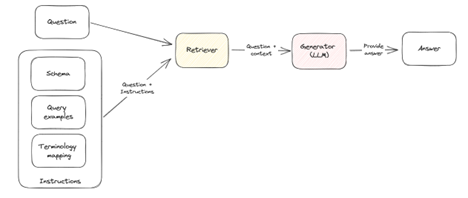
- Provide the schema (or Ontology): this helps the LLM understand what kinds of queries are valid and how to interpret results.
- Use common language: avoid cryptic labels. Use intuitive language in your domain graph that anyone can understand.
- Provide a Terminology Mapping: create a mapping between domain-specific terms (user language) and graph entities (ontology) to optimize interpretation
- Example: When a user asks about a product (e.g. mortgage, credit card, savings account), they are referring to nodes with the label Product, which may have subtypes such as Mortgage, CreditCard, or SavingsAccount.
- Give query examples: provide examples of questions and their corresponding cypher queries
Making GraphRAG Smarter and More Autonomous with Agentic AI
AI Agents are systems that use GenAI at their core. To enhance the reliability and relevance of responses, Agentic AI enables intelligent components that leverage an (or LLM’s GenAI) ability to reflect, use tools and plan. This is for example a step beyond the Tool usage as described in section 2.2., which is more reactive in nature (based on a question, the LLM selects a template). Within the space of GraphRAG, Agentic AI can really help to boost accuracy and reliability further, (e.g. by unlocking capabilities as multi-hop reasoning) with components such as:
- Retriever Agent: actively searches for the most relevant data by refining queries and interacting with external sources.
- Retriever Router: intelligently selects the best retrieval strategy or tool (e.g. query template) based on the query type, ensuring optimal data access.
- Graph Traversal Agent: intelligently walk through the graph to collect relevant information, using for example PageRank or ShortestPath
- Answer Critic evaluates the generated response for factual accuracy and relevance, refining it if necessary.
Evaluation
As described, implementing GraphRAG requires various components that interact with each other to come up with reliable responses to user questions. Evaluation is needed to determine whether in fact we are providing quality responses, and to enable optimization. We can create a benchmark dataset that includes diverse queries (mapping from questions to cypher queries) that the LLM should be able to answer using the knowledge base. To get a sense of the performance at the different stages of the solution, we are interested in figuring out the following metrics:
- Context recall: is the retrieved information relevant?
- Faithfulness: is the answer consistent with the retrieved context?
- Answer correctness: does the answer fully and accurately address the query?
Putting it all together
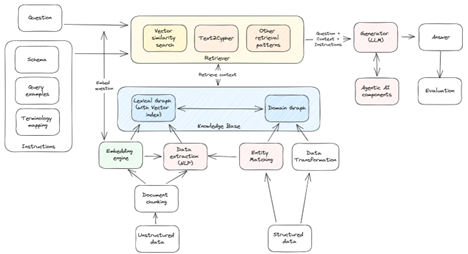
Combining all of the above gives us the following GraphRAG component architecture.
Conclusion
GraphRAG is not just a promising technology—it’s a strategic enabler for Rabobank’s GenAI journey. By focusing on practical use cases, explainability, and integration with existing platforms and services, we can unlock real value and better serve our customers.