AI Agents in Practice: Insights, Challenges and What We've Learned
As AI evolves from static LLMs (Large Language Models) into more dynamic and reasoning-driven systems, we started running into a familiar question in our own work: at what point does a language model stop being "just a model" and become something we can actually rely on in production?
Instead of merely generating content, AI agents can reason, use tools, take actions, remember context and even collaborate with other agents. This represents a significant shift from traditional chatbots and marks a new phase in how we design AI-powered systems.

- Buse Yalcinkaya DemirData Scientist/Engineer
In this article, “we” refers to our engineering team within the Digital Platform tribe, where we experiment with AI agents and multi-agent architectures to build practical, production-oriented solutions. The insights and trade-offs discussed are drawn directly from hands-on experiments and prototypes developed during this work.
What Exactly Is an AI Agent?
You can think of an AI agent as a smart assistant with hands, eyes and a plan. A regular LLM only talks. An agent can act, look things up, use APIs, follow workflows and decide what to do next.
In simple terms:
An AI agent is a system in which a language model interacts with its environment to accomplish a goal by reasoning, planning and taking actions.
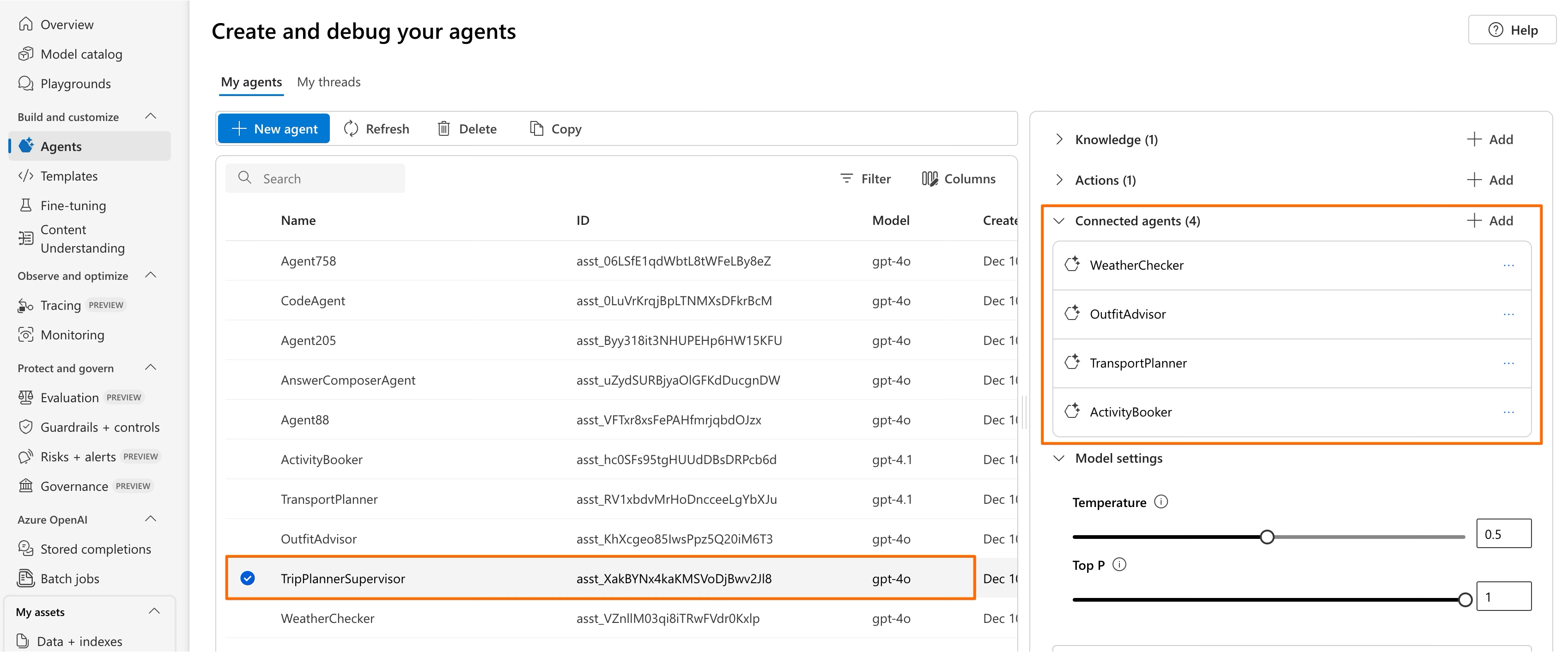
Instead of just telling you what flight to book, imagine an agent that helps you prepare a weekend trip: It checks weather, suggests outfits, plans transport and books activities, all without you orchestrating each step.
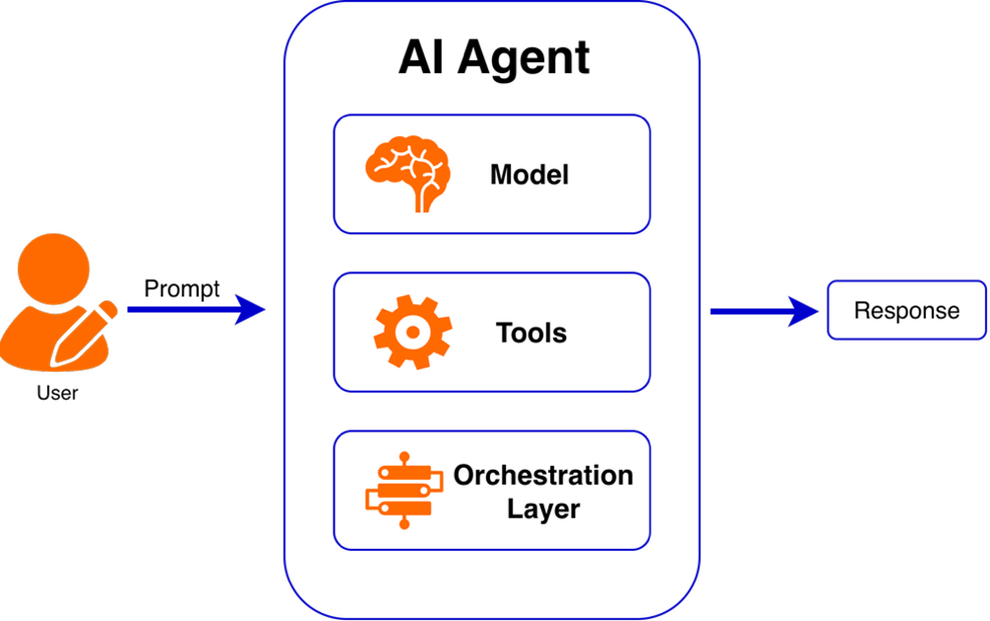
Key Components of an AI Agent
1. Model (the Brain)
The LLM interprets user input, reasons about the problem and decides the next step. It is the thinking part.
2. Tools (the Hands)
Tools let the agent reach the outside world through databases, APIs, search systems, computation and file access. Without tools, a model is like a brilliant person locked in a room with no internet.
Tools are essential for bridging the gap between the model and the real world.
3. Orchestration Layer (the Nervous System)
This layer manages the agent’s “thinking loop” and lifecycle:
- Reading context
- Deciding the next action
- Remembering useful details
- Calling tools
- Deciding when the task is complete
It coordinates how the agent processes information and acts on it.
From One to Many: Multi-Agent Systems
Single-Agent Systems
A single agent, equipped with tools and instructions, handles workflows end-to-end. This works well for simple or narrow tasks.
But single agents often face challenges:
- Too many tools -> confusion and wrong tool calls
- Complex prompts -> fragile behavior
- Limited context -> decreasing accuracy
- One generalist agent -> no specialization
- Hard-to-maintain if/else logic buried inside the prompt
Multi-Agent Systems
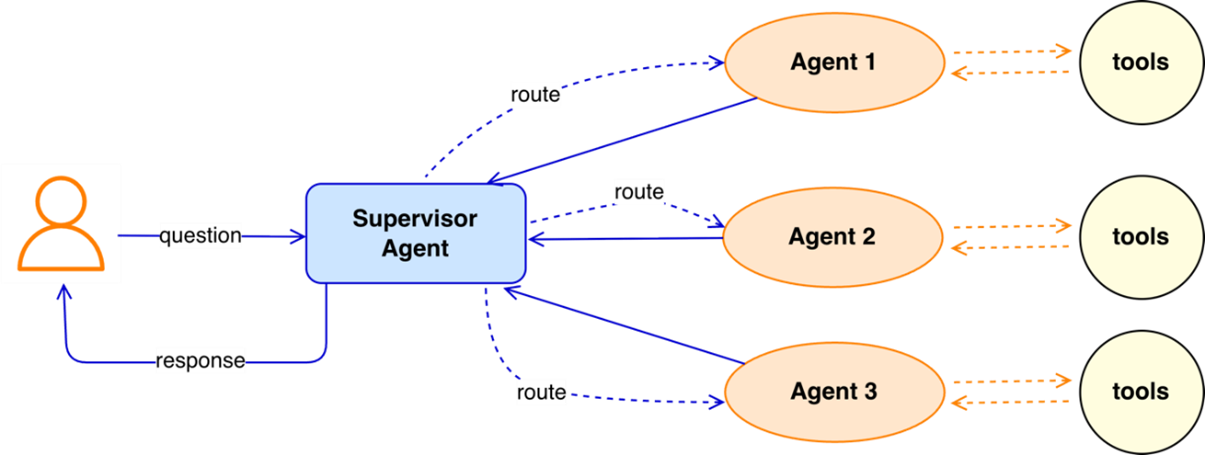
Instead of one overloaded agent trying to do everything, tasks are distributed across multiple specialized agents. Think of it as a well-coordinated team of experts rather than one overworked superhero. Each agent focuses on what it does best, and together they achieve complex goals more effectively.
Benefits:
- Agents become specialists -> better accuracy and more reliable outcomes
- Modular and easy to scale -> add more agents as the system grows
- Natural division of labor -> tasks are distributed logically across agents
- Efficient coordination -> communication frameworks enable effective agent collaboration
- More robust overall system (when designed well) -> reduces the risk of system-wide failure
By orchestrating specialized agents, multi-agent systems are able to handle complex tasks that require diverse expertise, such as reasoning, creativity, data retrieval and compliance. This makes them more robust, adaptive and collaborative than single-agent architectures, enabling real-world problem-solving.
Connected Agents in Azure AI Foundry
Azure AI Foundry is a unified platform to build and manage agents with built-in models, tools, frameworks and governance. We used its Agent service in our experiments because it removes infrastructure overhead and makes it easy to prototype and iterate on agent behavior quickly.
Connected agents in Azure AI Foundry allow you to build multi-agent setups without custom orchestrators or hand-coded routing logic.
A primary agent – also known as a supervisor, coordinator or main agent – coordinates the workflow and delegates tasks to sub-agents using natural language.
Key Features
- Flexible setup: Build agents via no-code UI in Azure AI Foundry or programmatically using the Python SDK
- Flexible model selection: Use Azure OpenAI models or others like Llama, Mistral and Cohere
- No custom orchestration: The main agent acts as a coordinator and routes tasks based on natural language
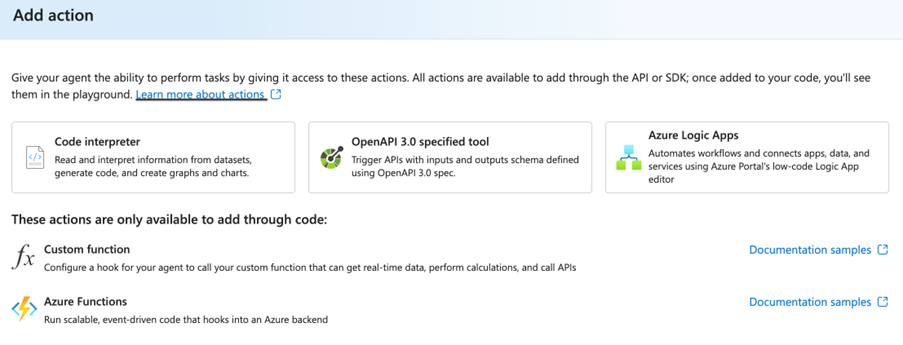
- Built-in tools: Includes retrieval tools, code interpreter and integrations with Bing Search, Azure AI Search, Azure Functions, etc.
- Tool calling: It automatically runs the model, invokes tools, tracks their execution and returns results
- Secure state management: Conversations and data are stored in threads, so developers do not need to manage state manually
The model identifies user intent and selects tools dynamically based on context and availability. Tools come in two categories:
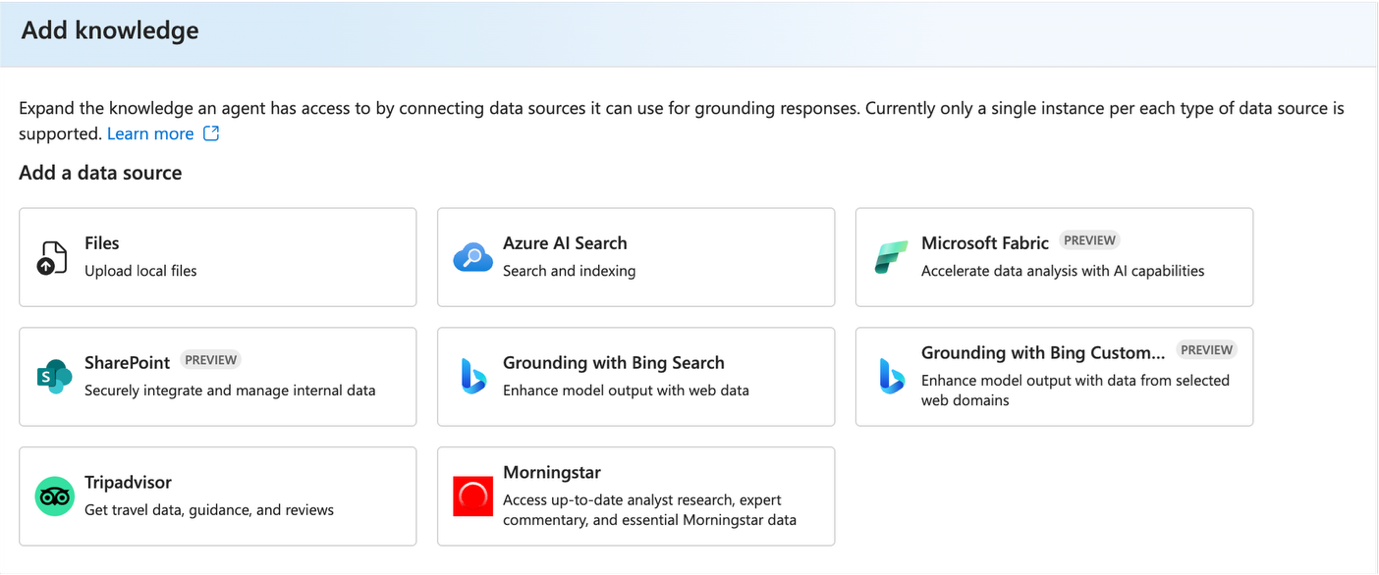
- Knowledge tools: Provide relevant knowledge or enhanced context – examples include Azure AI Search, File Search, Grounding with Bing Search and SharePoint
- Action tools: Execute tasks or perform actions – examples include Code Interpreter, Azure Functions and Azure Logic Apps
Limitations
- Only one instance per tool is supported
- Some tools can only be integrated via SDK, which requires code-based setup
- Tool specific instructions cannot be set directly
- Orchestration is implicit:
- The developer cannot fully control the exact order of agent invocation
- All orchestration decisions belong to the main agent → works well but is not always aligned with our desired outcomes
- Citation behavior inconsistent:
- No guarantee citations are preserved across agents
- Prompt engineering may improve it, but results can still vary
- Limited observability into what is happening behind the scenes
Connected Agents are quick to set up, great for experimentation with multi-agents and provide an accessible no/low-code entry point. But the workflow is nondeterministic, and orchestration happens mostly behind the scenes.
For our use case, we needed more control, transparency and reliability, so we moved toward a code-based multi-agent workflow.
Microsoft Agent Framework
To overcome the limitations of Connected Agents, we moved to the Microsoft Agent Framework, which is an open-source and developer-friendly approach for building customizable multi-agent workflows.
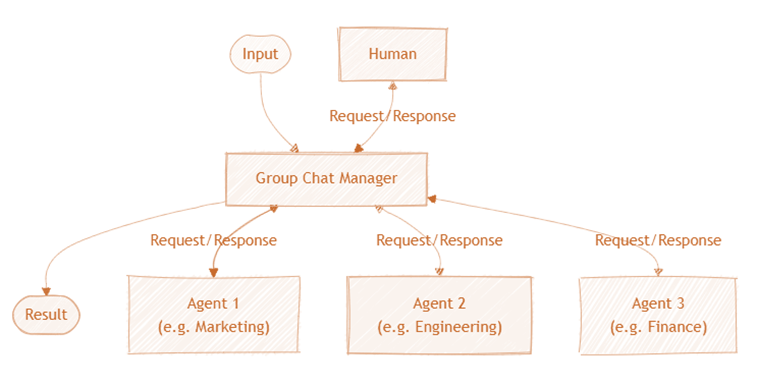
Workflows enable agents to follow a predefined order of execution, allowing us to orchestrate agent collaboration explicitly. This gives more control and clarity than relying solely on a primary agent or prompt engineering.
Why This Framework Is Powerful
It gives developers explicit control over multi-agent execution:
- Clear workflow definitions: Predefined execution order avoids unpredictable orchestration and makes reasoning flows fully transparent
- Modularity: Workflows can be split into small, reusable components that are easier to update and maintain without touching the whole system
- Built-in orchestration patterns: Choose from sequential, concurrent, group-chat, hand-off and magnetic multi-agent patterns
- Full observability with OpenTelemetry: Every agent action, tool invocation and orchestration step is automatically logged and traceable
- Developer UI: A ready-to-use web interface for demos and debugging with a single line of code – a huge accelerator for rapid iteration
- Human-in-the-loop: Tasks can be configured to require human approval where needed
- Secure execution: Agents run inside Azure AI Foundry with built-in RBAC, safety controls and private data handling
- Open standards support: Integrates with MCP (Model Context Protocol) and A2A (Agent-to-Agent) protocols to discover and use external tools and agents
Limitations
- Still in public preview, so occasional inconsistencies may appear
- Agent-supported models are limited
- Not yet recommended for running large-scale production GenAI solutions
Overall, early experimentation has been very promising. The Microsoft Agent Framework has a higher barrier to entry but offers full flexibility and explicit control. It enables developers to customize workflows, define agent behavior explicitly and build deterministic orchestration. While it requires more development effort, it supports scalability, precision and enterprise-grade reliability.
Challenges We Faced
Several recurring pain points surfaced during our experiments:
- The supervisor agent sometimes dilutes or misinterprets sub-agent outputs
- The supervisor agent does not reliably trigger sub-agents in low-code environments
- Sub-agents occasionally outperform supervisor agent
- Tool calls may be skipped or misused
- Low-code environments hide orchestration details
- Delegation issues can lead to retries, errors or incorrect routing
Insights & Lessons Learned
Ask First: Do You Really Need an Agent?
Not every problem needs an agentic solution.
Sometimes an AI agent is simply not needed and may even perform worse than a straightforward approach. In such cases, using AI agents can introduce extra uncertainty, latency and cost.
Use an agent when:
- Tasks are dynamic, ambiguous and multi-step
- Tool access is essential
- The exact sequence of steps is unknown
- Decisions depend heavily on context
Avoid agents when:
- Rules are fixed
- Outputs are deterministic
- Workflows are well structured
- Standard LLM calls or functions are enough
Start Simple, Then Iterate
- Begin with one agent, minimal tools, and clear instructions
- Scale only once the basics work reliably
Single Agent vs. Multi-Agent
A single generalist agent can work for simple cases, but it becomes fragile when the use case grows in scope or requires diverse skills. Instead of relying on one agent with a large prompt and many tools, distribute the work across multiple specialized agents. Each agent focuses on a specific task, which leads to clearer roles, fewer errors and more stable performance.
Prompt Design Matters
System prompts define how an agent behaves throughout a conversation.
Effective prompts:
- Define scope, role, task and boundaries
- Include examples with types of input the agent will receive and the expected outputs
- Remain consistent across all agents
- Follow the single-responsibility principle
- Allow agents to say “I do not know”, so that they do not hallucinate or act outside their scope
Good prompt design is essential because small wording changes can lead to major shifts in behavior, which means careful prompt engineering is required for consistent results.
For comprehensive guidance, refer to the official resource on prompt engineering techniques.
Picking the Right Model
Do not automatically choose the strongest or newest model.
Choose based on:
- Cost
- Latency
- Reasoning needs
- Tool call reliability
Use the AI Foundry Model Catalog to guide model selection.
Choose the Right Orchestration Pattern
Well-designed systems are modular, like LEGO blocks. This makes them easier to maintain, reason about and scale.
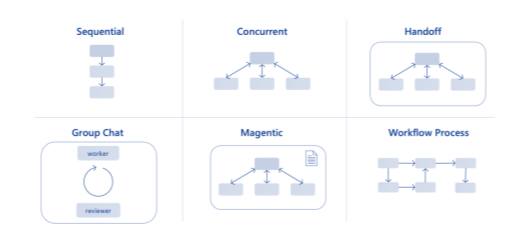
- Choose an orchestration pattern that fits the use case (sequential, concurrent, handoff, hybrid)
- Design agents as independent components that combine into a larger whole
- Version orchestration changes to keep track of updates and simplify debugging
- Ensure the orchestration layer handles coordination, task prioritization and conflict resolution
- Avoid overly complex patterns when a simple sequential or concurrent flow is sufficient
- Reading tasks are inherently more parallelizable than writing tasks
- Creating multiple agents is easy; enabling them to work together reliably is the real challenge
Tools
As the number of tools and data sources grows, predictable behavior becomes more difficult. Tool reliability depends on model behavior, prompting and system design.
- Assign only the tools an agent truly needs
- Provide explicit guidance on when and how tools should be used
- Use tool invocation logs for interpretability and observability
- Expect occasional tool-call failures and design around them
- Model differences matter; some models follow tool-use instructions more reliably than others
- Keep tool sets focused to avoid unnecessary routing complexity
Memory
- Local memory often works better than global memory
- Not all agents need full chat history; give only the amount of context the agent needs (full, summarized or none)
- Reducing unnecessary context helps with latency, token usage and consistency
- Controlled context flow keeps multi-agent systems more stable
Continuous Evaluation
Agent systems require iterative testing and refinement.
- Begin with a small evaluation set and expand gradually
- Test with messy, multilingual, real-world inputs to simulate actual user behavior
- Evaluate each agent independently, then test the full end-to-end flow to ensure routing and collaboration work correctly
- Compare how a specialized agent and a supervisor agent handle the same query
- Define metrics for routing accuracy, tool use, reasoning quality, and output correctness
- Keep human-in-the-loop where appropriate
- Collect user feedback and integrate it into the improvements
- Monitor and version all changes
Latency
- Reasoning, retrieval and tool calls substantially contribute to delays
- Optimizing each step is essential for a smooth user experience
Key Takeaways
- Avoid over-engineering, and use agentic solutions only when they add real value
- Understand both the capabilities and limitations of agents
- Guardrails are essential to keep the agent on track
- Always evaluate outputs critically
- There is no single best approach; experiment with and compare multiple approaches
- After experimentation, ask whether agents truly outperform existing solutions or standard LLM approaches
- Safety, reliability and responsible design matter
- Current agent workflows are promising but not yet stable and reliable enough for production
Guardrails minimize risks by keeping the system aligned with its original scope, vision and design. Think of them as safety barriers: They prevent your agent from going off course.
Conclusion
AI agents are rapidly becoming part of everyday digital experiences, supporting automation, decision-making and complex workflows across industries. To build them effectively, teams need a clear understanding of their strengths, limitations and design principles that guide responsible use.
While we are still at the first stages of this journey, one thing is already clear from our experiments: Agentic systems hold significant potential, but they only excel when supported by thoughtful engineering, solid guardrails and continuous evaluation.