ADWS: an unconventional path into Active Directory
As the Rabobank Red Team our goal is to simulate cyberattacks on the Organization's systems and serving a crucial role in defending against cyber-attacks by looking at the bank from a malicious perspective. The Rabobank Red Team researchers attack paths and where needed the development of tools. This can be used to assess our global resilience.
This blog post will introduce Active Directory Web Services (ADWS), enable debugging options to investigate its structure and flow, show the differences between LDAP and ADWS, translating LDAP requests to ADWS requests and combining that all into an application which will proxy LDAP traffic to an ADWS endpoint.

- Luc KolenEthical Hacker
Introduction into Active Directory
Active Directory (AD) consists of a database and set of services, that connect users with the resources necessary to conduct their work. The database contains critical information about the environment, such as information about users, computers, and permissions. Analyzing this data can help identify lateral movement paths, from low privileged to high privileged access, within the environment. This would (1) aid the attacker in achieving their goals and (2) increase the efficiency which would lower the chances of being detected.
A common protocol to enumerate AD is the Lightweight Directory Access Protocol (LDAP) via the Active Directory Lightweight Directory Services (AD LDS). Both malicious and non-malicious actors make use of this service. These malicious actors target LDAP because it can be a gateway to valuable information stored in AD. Most organizations will have detection rules in place against malicious activities via LDAP query monitoring.
Introduction into ADWS
Microsoft unveiled ADWS with the release of Windows Server 2008 R2. Subsequently, Microsoft has integrated this feature into every iteration of Windows Server after that, and ADWS is enabled by default upon promoting a Windows Server to a domain controller. The promotion procedure does not explicitly highlight the activation of ADWS, potentially leading to oversight by the individual performing the promotion. Consequently, there exists a possibility that ADWS could remain active without appropriate security measures.
At time of writing, searching on Google for LDAP monitoring results in almost sixteen million results where ADWS monitoring results in less than twenty thousand results. It even gives the suggestion ADS monitoring which has nothing to do with ADWS. This has changed after FalconForce, who independently did a deep dive into ADWS at the same time, released their blog post about ADWS.
ADWS will by default listen on TCP port 9389 for incoming Simple Object Access Protocol (SOAP) messages. Resource Monitor, which is available by default on Windows Server, confirms the usage of this TCP port via both IPv4 and IPv6:
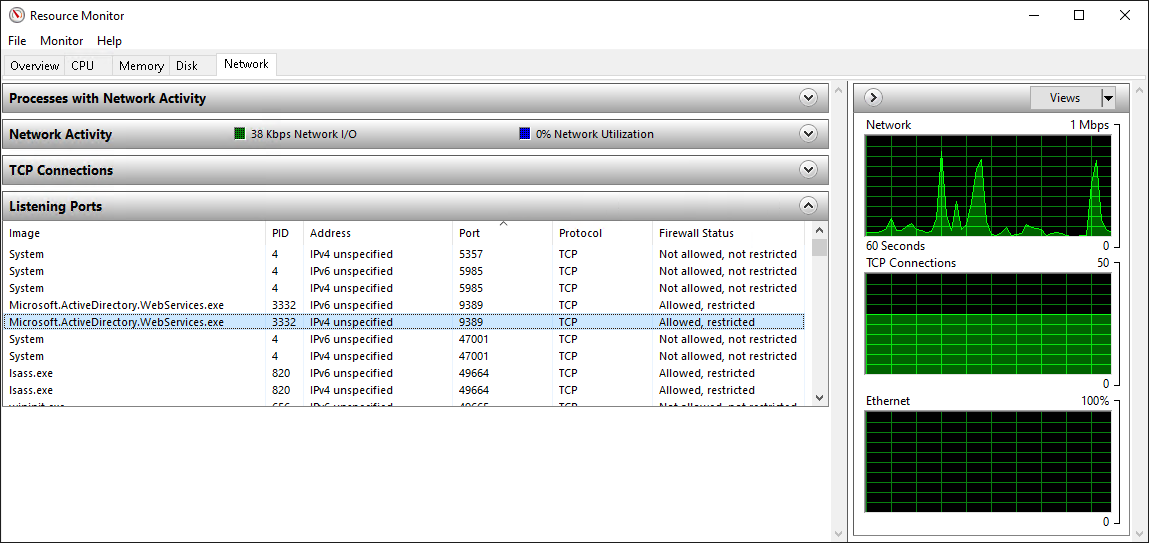
The executable shown in the screenshot, Microsoft.ActiveDirectory.WebServices.exe, is in the C:\Windows\ADWS\ folder. This folder also has the following configuration file; Microsoft.ActiveDirectory.WebServices.exe.config. The changes to this configuration file will be in use after a restart of the service. The next chapter will show the changes made to this configuration file to enable the saving of debug messages. This will give a further insight into ADWS.
Enabling SOAP XML debugging
Microsoft provides documentation about enabling the viewing of SOAP XML messages sent to ADWS. These steps start by stopping the running ADWS process. An administrator account on the domain controller needs to execute the following commands to stop ADWS:
Listing 1: Stopping ADWS on a domain controller.
The next step for the user is to update the C:\Windows\ADWS\Microsoft.ActiveDirectory.WebServices.exe.config file. After the </appSettings> tag the following lines are added to the log file to C:\Windows\Debug\ADWSlog.svclog:
Listing 2. This XML data defines where ADWS will store the messages.
And add the following lines after the <system.serviceModel> tag, this will set which data ADWS will add to the logs:
Listing 3. This XML data defines which messages are logged by ADWS.
An administrator account on the domain controller needs to execute the following commands to start ADWS with the new settings:
Listing 4. Starting ADWS on a domain controller.
Now we can evaluate the logging by sending a request via ADWS by utilizing the Active Directory Module for Windows PowerShell. For instance the Get-ADComputer command:
Listing 5. Using the Get-ADComputer command to get data via ADWS.
The Microsoft Service Trace Viewer application can open the C:\Windows\Debug\ADWSlog.svclog file:
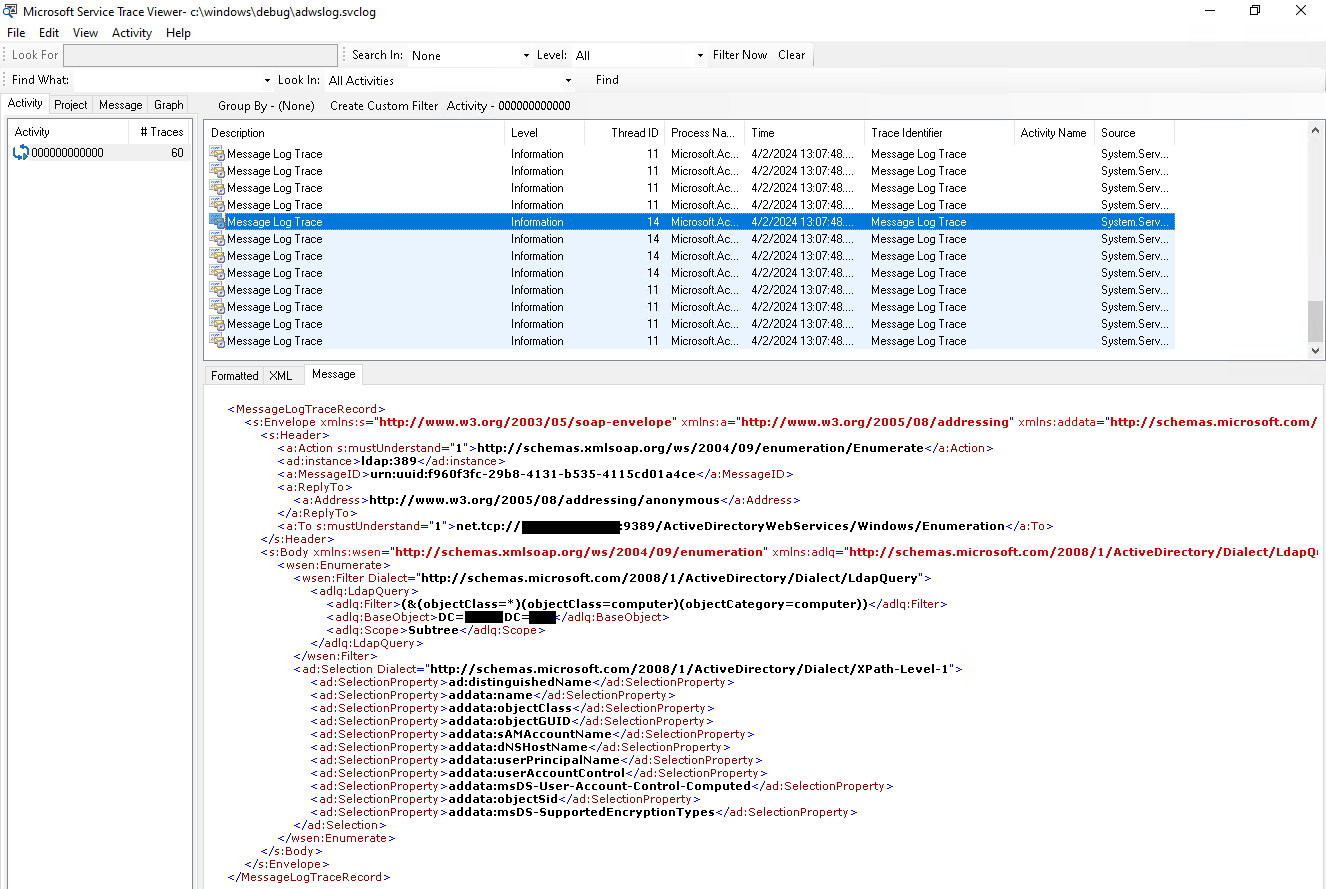
This log confirms that SOAP is in use here as the format for these ADWS messages. This logging of messages will also aid in the development of a client application which makes use of ADWS. Messages created by the client application can be compared to messages created by the PowerShell module.
Endpoints
Microsoft has documented the Web Service endpoints that are in use within the ADWS protocol set.
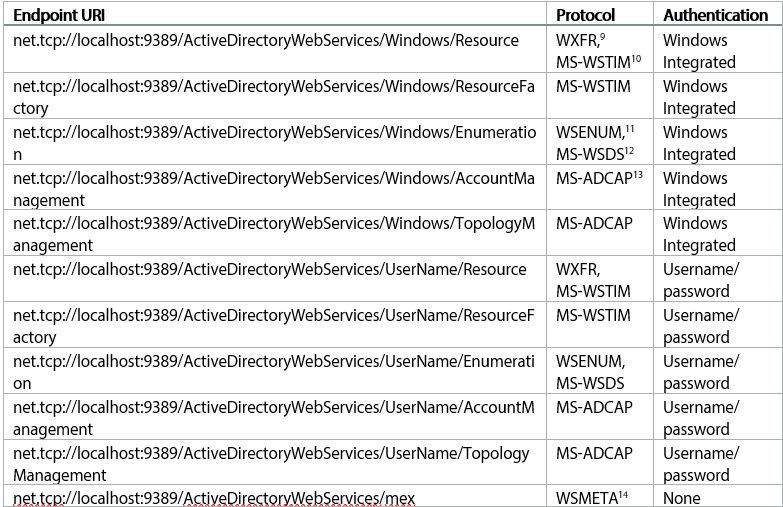
The mex endpoint exposes the metadata which describes the other endpoints within ADWS. This endpoint does not require authentication. SvcUtil.exe can create code based of the metadata exposed by this endpoint.
Listing 6. Generating C# code based on the mex endpoint.
This ActiveDirectoryWebService.cs file can be used to connect to the Resource, ResourceFactory, Enumeration, AccountManagement and TopologyManagement endpoint URIs by a developer creating a C# application. For instance, the Resource endpoint URI can be used by the ADWSBlog.ADWS.ResourceClient class within the generated file.
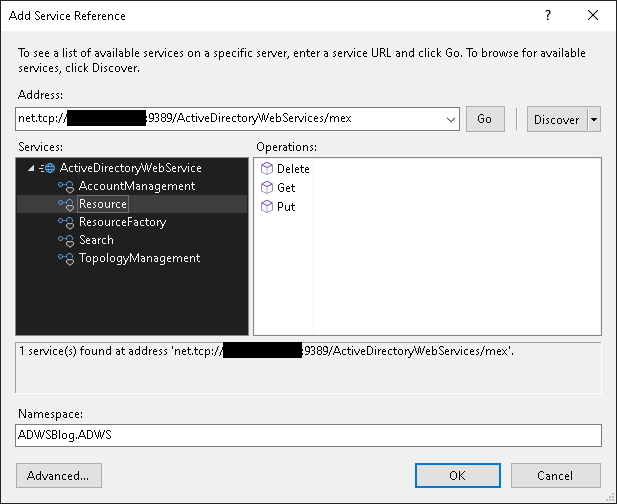
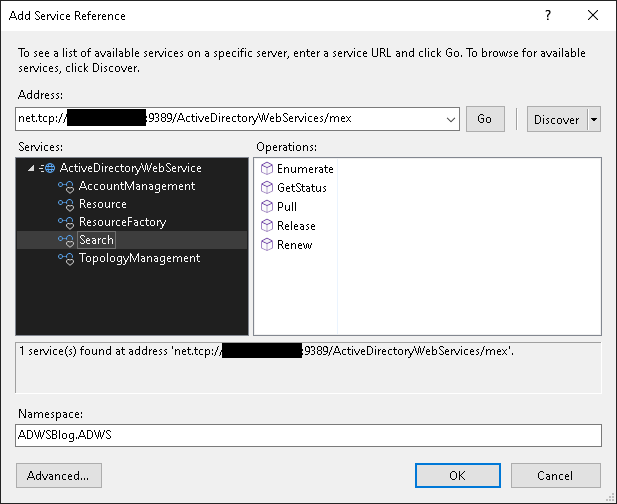
It is also possible to import the mex endpoint directly in Visual Studio by adding a service reference. Using this method will also show the operations available for each endpoint. The main two endpoints in this post will be resource and search:
RootDSE
The RootDSE is a special entry that provides information about the directory server. It is the root of the directory tree and contains operational attributes that pertain to the directory server. This can obtain information about the directory service, such as its capabilities and configuration. Within LDAP this object is obtainable by setting the search scope to base and the base distinguished name to an empty string:
Listing 7. Obtaining the RootDSE via LDAP.
The attributes contained within this RootDSE are available via ADWS by issuing an authenticated request to the Get operation within the Resource endpoint. It is important to note here that within ADWS this is an authenticated request where LDAP allowed for unauthenticated access to the RootDSE object. The request to this endpoint will always have the objectReferenceProperty element in the Header set to the value 11111111-1111-1111-1111-111111111111.
Listing 8. The request message to the Get operation within the Resource endpoint.
This request will result in the following response from the Get operation within the Resource endpoint.
Listing 9. The response message from the Get operation within the Resource endpoint.
Search flow
The RootDSE request and response from the previous example showed that the data accessible via ADWS and LDAP are similar. These similarities continue when investigating the Search endpoint where LDAP queries are used to request data via ADWS. Four authenticated operations are available to request this data:
- Enumerate
- Pull
- Renew
- Release
Enumerate
The Enumerate operation is used for receiving a LdapQuery object and a Selection object. The LdapQuery object has three fields which are also included in any normal LDAP request.
- Filter: This field contains the LDAP filter which is used to search and retrieve specific entries based on attribute matching.
- BaseObject: This is called the base distinguished name within LDAP. It is the starting point of the directory tree from which the search begins. Setting this value to DC=example,DC=com will search the entire example.com domain.
- Scope: This field has three values and will control the extent of the search.
- One: immediate children excluding the base object itself.
- Base: limited to the base object, maximum number of returned objects is always one.
- Subtree: all entries under the BaseObject including the base object itself.
The Selection object holds a list of SelectionProperty items. These items will control which properties are included by the ADWS service in the response. These fields can either be in the http://schemas.microsoft.com/2008/1/ActiveDirectory or http://schemas.microsoft.com/2008/1/ActiveDirectory/Data namespace.
Listing 10. The request message to the Enumerate operation within the Search endpoint.
The response to this request will have an EnumerateResponse object. This object has two fields:
- EnumerationContext: this is a GUID which can be used to obtain the results of the query.
- Expires: every EnumerationContext is only valid for a limited amount of time. The default lifetime of an EnumerationContext is thirty minutes.
Listing 11. The response message to the Enumerate operation within the Search endpoint.
Pull
The Pull operation is used for receiving the data requested by the previous Enumerate operation by using the EnumerationContext from the that response. There are also two other properties which can be set:
- MaxElements: This defines the number of objects to return per page of results.
- Controls: The field; nTSecurityDescriptor, is not returned by ADWS without setting extra control values. By setting this value we get the correct information.
Listing 12. The request message to the Pull operation within the Search endpoint.
The request results in the following response. This response has all the properties which were requested and an extra field as objectReferenceProperty is always returned by ADWS.
Listing 13. The response message to the Pull operation within the Search endpoint.
Pages
The response to the previous Pull operation had four times the number of results that fit in a page and thus only the first page was returned. The next page of results can be obtained by resending the previous request to the Pull operation:
Listing 14. The request message to the Pull operation within the Search endpoint.
The response will have the next page of results:
Listing 15. The response message to the Pull operation within the Search endpoint.
The response which was send by the previous Pull operation included <wsen:EndOfSequence></wsen:EndOfSequence>. This is used to notify the receiver of this data that this is the last page of data for that enumeration context.
Renew
Each EnumerationContext is valid for a certain amount of time. However, in large environments it is possible that not all data can be returned within that time which by default is set to thirty minutes. For this the renew operation can be used. This operation will as the name suggests make sure that the EnumerationContext will not expire at the original time, but at the newly set time.
Listing 16. The request message to the Renew operation within the /earch endpoint.
The response will have two fields, the expiration time and the enumeration context which has been renewed.
Listing 17. The response message to the Renew operation within the Search endpoint.
Pulling results from this renewed enumeration context will continue like normal. So, if page four was the last pulled page the next pull operation will return page five.
Release
There is an ADWS settings which sets the maximum number of enumeration contexts to be created per client-to-server session. By default, this setting is set to five active contexts. It is good to limit the number of contexts which are active as hitting this limit will hinder the creation of new contexts. For this the Release operation within the search endpoint is used.
Listing 18. The request message to the Release operation within the Search endpoint.
ADWS will respond with an empty body to confirm that the enumeration context has been released.
Listing 19. The response message to the Release operation within the Search endpoint.
After this the enumeration context is no longer active. Importantly it will no longer count towards the limited number of active connections allowing for more ADWS requests to be sent by the client application.
Authentication
ADWS, except for the mex endpoint, only allows authenticated requests. As noted in the list of endpoints, ADWS supports two different authentication methods:
- Windows integrated
- Username/Password
Windows integrated
Windows integrated will work out of the box on any Windows Server which has ADWS enabled. A client application created in C# can connect and authenticate to ADWS like this:
Listing 20. Windows authentication to ADWS endpoint implemented in C#.
The code has commented out the manually setting the values for the Username, Password and Domain as this authentication method will use the currently signed in domain account when run like this. Manually supplying the credentials here will make it possible to use Windows authentication from a machine not joined to the domain.
Username/Password
The usage of Username/Password authentication relies on TLS to encrypt and sign the messages. TLS needs a certificate to function, so the Windows Server needs to have a valid certificate. Most networks will have a Windows Server running as a certificate authority inside the network so this should not be a breaking issue.
The Windows Event viewer can be used to verify if a certificate is loaded correctly. ADWS related events can be found in Event Viewer/Applications and Services Logs/Active Directory Web Services. In case a valid certificate is not present an event with id 1400 will be created with the following contents:
Listing 21. Contents of event id 1400.
The log which confirms the successful load of a certificate has event id 1401 and the following contents:
Listing 22. Contents of event id 1401.
The NetTcpBinding can be configured to use this authentication method can be configured like this:
Listing 23. Username/ password authentication to ADWS endpoint implemented in C#.
The credentials cannot be omitted here as Username/Password authentication does not take the account of the currently signed in user into account.
Global Catalog
The previous examples all used ldap:389 for the value of Header.Instance. This instructs ADWS to limit the query to the local domain. The RootDSE object included the following data:
Listing 24. RootDSE showing that Global Catalog is supported.
This shows that ADWS also supports to return data from the Global Catalog. The Global Catalog contains a partial copy of all domains in the forest, notably all the attributes where the isMemberOfPartialAttributeSet attribute of an attributeSchema object is set to TRUE.
A user account in the example.com domain can be part of a group in the test.example.com domain which is a trusted domain within the forest. Information about this group in the test.example.com cannot be obtained by using ldap:389 as the value of Header.Instance. This data can be obtained by changing that value to ldap:3268 as this instructs ADWS to make use of the Global Catalog. Using this value will allow the usage of DC=test,DC=example,DC=com (or any other domain within the forest) as the BaseObject.
LDAP can be used to obtain the list of attributes which are replicated in the Global Catalog:
Listing 25. Using LDAP to obtain the attributes which are replicated in the Global Catalog.
On a default Windows Server 2016 domain controller this resulted in 201 attributes which were set to be replicated in the Global Catalog compared to twenty-four attributes which were not replicated. This shows that ADWS can be used to query for a lot of data from trusted domains as almost ninety percent of attributes are in the Global Catalog.
Creating an LDAP endpoint
The previous chapters show how data can be obtained by using ADWS. However, this would require developers to implement the functionality offered by tools like Bloodhound-Python inside their own ADWS applications.
An alternative for recreating each LDAP application in ADWS is to create a proxy application which accepts LDAP requests as input, processes that request via ADWS and then returns the data via a LDAP response. To create a LDAP listener the Rabobank Red Team made use of the open source Flexinets.Ldap.Core library. This library allowed for the processing of incoming LDAP packages and extracting the required LdapQuery, scope and Selection objects.
Differences between LDAP and ADWS
Distinguished name
There are some differences between ADWS and LDAP which came up during this development step. A LDAP response will always have the distinguishedName attribute of an object to identify which object the attributes belong to. This is not the case for ADWS where always an objectReferenceProperty is send in the response. To work around this issue the proxy application will always request the distinguishedName when this is not explicitly requested by the LDAP application:
Listing 26. C# implementation to make sure that the distinguishedName attribute will always be in the results.
RootDSE
There are also differences between the LDAP endpoint which is exposed by the proxy application and the LDAP instance active on the Windows Server machine. The RootDSE is used by LDAP clients to determine which features are supported. The RootDSE object from the server is obtained using ADWS to get the correct information about the server, for instance, the Windows Server version, support for Global Catalog, and the naming context. Some values in the RootDSE object need to be filtered to make sure that the LDAP client which connects to the proxy knows which controls are available.
The LDAP endpoint exposed by the proxy application is quite basic compared to the LDAP endpoints exposed by Windows Server. There is no support for SASL authentication and LDAP paging. There also is no support for + and @, these two attributes instruct LDAP to either return optional or all attributes for a class. Removing these values from the RootDSE before sending the RootDSE object to the LDAP client will make sure that these are not used within the LDAP session.
Listing 27. Filtering unsupported LDAP features from the RootDSE returned by the LDAP endpoint.
Handling search requests
Incoming LDAP search requests will be in the format of a LdapPacket object. This object needs to be parsed to get the distinguished name, scope, filter, and the requested properties. The distinguished name will always be the value of the first child attribute of the search request. The scope is in the second child attribute and its value is a byte which notes which scope is requested. The filter can be parsed by getting the attributes which have their Class value set to TagClass.Context. These will be parsed using the ParseFilters function. The properties are in the last child attribute of the search request, and they will get parsed using the ParseProperties function.
Listing 28. Parsing a LDAP search request packet in C# using the Flexinets.Ldap.Core library.
As noted in the code above ParseFilters is used to parse the filter attributes which were in the search request. This method will loop over all filter attributes and parse them individually with the ParseFilter function.
Listing 29. Parsing all included filters using the ParseFilter function in C#.
This ParseFilter function will recursively go over each filter attribute. Each filter attribute itself can also contain filter attributes so this function will recursively parse filter attributes till all attributes are parsed. The resulting string will represent the original LDAP filter which can now be used within ADWS.
Listing 31. The ParseProperties function will parse the properties value from a LDAP attribute in C#.
This function will also filter out the + and @ properties. LDAP clients which connect to the proxy application already got informed that these properties will not be supported, however, it is possible that the LDAP client ignores this RootDSE object. This way only supported properties will make it into the ADWS request.
ADWS vs LDAP data format
ADWS is a SOAP based protocol so binary data will be Base64 encoded and sent over as a string. LDAP does send over binary data, so all Base64 encoded data from ADWS needs to be decoded. This binary data includes fields like the NTSecurityDescriptor. The reading of the data which is returned by ADWS during the Pull operation is managed within the PullResponse class:
Listing 32. OnReadBodyContents will read the contents of an ADWS pull response message.
ObjectSid handling
During the test phase it was noted that using the objectSid field in a filter within the LDAP query there were two different data formats used. Option one was sending the data as bytes which could be converted to the sid using the SecurityIdentifier class. However, it could also be sent as a string representing the objectSid. To manage this and accept both cases the proxy will check if the byte value can be parsed using the SecurityIdentifier class and if not, it will use the value as a string:
Listing 33. The ParseFilter needs a special handling of the ObjectSid value.
This resulted in successfully parsing the correct value in the filter from LDAP to ADWS. This is important as Bloodhound-Python was one of the applications which required this.
Conclusion
The Rabobank Red Team developed an application which can be used to connect applications that make use of LDAP/Global Catalog to connect to ADWS. At the time of writing, the Rabobank Red Team has successfully evaluated this proxy application with the following LDAP client applications:
- Bloodhound-Python
- AdFind
This list of applications reflects the applications used by the Rabobank Red Team to develop and test this proxy application and is not intended to be a complete list of applications that can be used to query ADWS. The proxy itself is available as open source on the Rabobank Red Team GitHub in a public repository, in case other Red Teams want to assess their Organizational resilience to these activities.