3 Die-Hard Lessons We’ve Learned When Using Databricks Asset Bundles
There’s always a tiny resistance when challenges come out of the darkness.
Then, it becomes that little spark. That friction you feel. That internal struggle whether you want to solve it or not. I think that’s for every IT professional doing his job on a day-to-day basis, facing those challenges. But afterwards, it is the lessons learned. The knowledge that you’veperhaps gained.
I already had the opportunity to build a solid foundation to implement IaC with Databricks Asset Bundles (DABs). But after experimenting with them for quite a while, it was time to share the lessons learned from working with DABs. In this blog post, I’ll share 3 die-hard lessons learned from the field. Let’s get to the first one.

- Gijs ReijnCloud Engineer
1 - It’s not all publicly available
I don’t have to tell you that security is a key responsibility for every developer and DevOps engineer who works (me) in the financial sector. Every environment type, like development or production, has its own boundaries about what can be done, and what not. Still, there has to be a certain flexibility for a developer or DevOps engineer. These environments, or local machines, are commonly known in the IT industry. They go by many names. For example, a developer box (or Dev Box), cloud workstation, a hardened laptop, or even a Windows Server where IDEs and tools can be installed.
That sets the ground perfectly for developing, more specifically, the DABs. But that’s where the first lesson was also learned quite quickly.
Whenever I was developing DABs, the approach you most likely will follow, is something like this:
- First, you install the Databricks CLI onto your machine
- You install Visual Studio Code as your IDE
- Then, you grab the Databricks extension for Visual Studio Code
If the extension is installed, you need to have a configuration file. This configuration file is known as: ᴅᴀᴛᴀʙʀɪᴄᴋꜱ.ʏᴍʟ. The following snippet demonstrates a bare minimum:
Inside the <ᴡᴏʀᴋꜱᴘᴀᴄᴇᴜʀʟ> placeholder, you would enter one of your Databricks instance. If that’s successfully done, and you open the extensions blade, the bundle resource explorer shows you what is ready to be deployed. The following image illustrates a successful connection towards a Databricks instance.
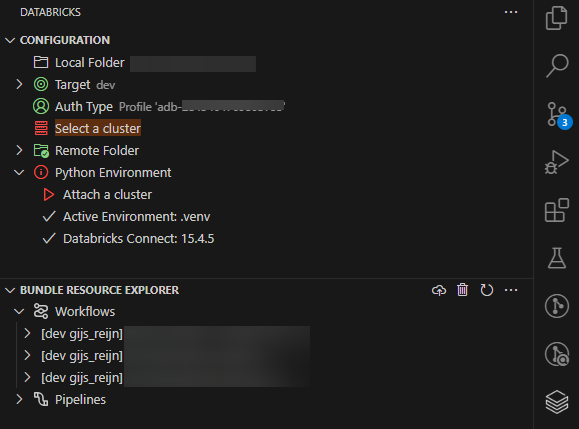
Everything is still perfect. Before pressing that little upload icon button next to the trashcan, I opened a terminal window. I typed in ᴅᴀᴛᴀʙʀɪᴄᴋꜱ ʙᴜɴᴅʟᴇ ᴠᴀʟɪᴅᴀᴛᴇ --ᴛᴀʀɢᴇᴛ ᴅᴇᴠ to do the first validation. The validation looked good, time to deploy the bundle. Auch, an error occurs: Error: ᴇʀʀᴏʀ ᴅᴏᴡɴʟᴏᴀᴅɪɴɢ ᴛᴇʀʀᴀꜰᴏʀᴍ: ɢᴇᴛ "ʜᴛᴛᴘꜱ://ʀᴇʟᴇᴀꜱᴇꜱ.ʜᴀꜱʜɪᴄᴏʀᴘ.ᴄᴏᴍ/ᴛᴇʀʀᴀꜰᴏʀᴍ/<ᴠᴇʀꜱɪᴏɴɴᴜᴍʙᴇʀ>/ɪɴᴅᴇx.ᴊꜱᴏɴ": ᴇᴏꜰ.
What I kept out of this story, was already the fact that, when installing the CLI, I didn’t do it through the normal route. That normal route would be to grab it from GitHub as an example. Rather, I had to grab it from a share, as I was working in an isolated environment. The same applicable for the extension. What I didn’t take into consideration was, when using the ᴅᴀᴛᴀʙʀɪᴄᴋꜱ ʙᴜɴᴅʟᴇ ᴅᴇᴘʟᴏʏ command, it was going to reach out to the internet. It didn’t happen to me when I ran in ᴅᴀᴛᴀʙʀɪᴄᴋꜱ ʙᴜɴᴅʟᴇ ᴠᴀʟɪᴅᴀᴛᴇ --ᴛᴀʀɢᴇᴛ ᴅᴇᴠ.
The command clearly required two things to do its magic when using deploy: the Terraform executable and the Databricks provider.
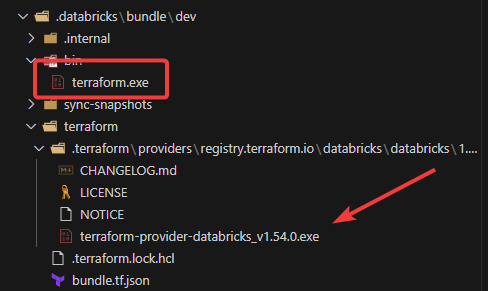
To solve this in an isolated environment, there were two possible solutions:
- Either create a private container registry and use the Docker image Databricks provide e.g. ᴅᴏᴄᴋᴇʀ ᴘᴜʟʟ ɢʜᴄʀ.ɪᴏ/ᴅᴀᴛᴀʙʀɪᴄᴋꜱ/ᴄʟɪ:0.241.2
- Upload both executables in a share, use the Terraform configuration file to setup a mirror, and then, lock the version.
So, that was the first lesson learned. I always have to keep in mind multiple factors. Especially when working in an isolated environment, as not everything is publicly available(which is, of course, a good thing in many cases).
Lesson 2 - Syncing file behavior
After experimenting for a while, checking out the syntax of DABs, and getting more comfortable, we (me and my colleague) decided to implement it further in the DevOps pipeline. More and more files were added to the repositories. Job workflows wereadded and clusters are included as part of the deployment.Many things went pretty “okayish”. Expect the pipeline time kept increasing. This was because we kept adding files into the repository.
Here’s the strange thing. Testing things locally was a guarantee of speedy delivery to Databricks' workspace. So, why wasn’t the same behavior observed during the pipeline run? When we started creating the structure of the DABs, you’veprobably started with the same command as we did. It’s the ᴅᴀᴛᴀʙʀɪᴄᴋꜱ ʙᴜɴᴅʟᴇ ɪɴɪᴛ command, which in turn lets you decide which template structure you want to get started from.
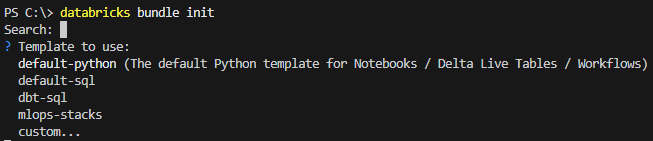
What the command also does, is create a .ɢɪᴛɪɢɴᴏʀᴇ file if not present, and adds the .ᴅᴀᴛᴀʙʀɪᴄᴋꜱ folder seen in earlier image. You can already guess a bit where this is leading to. But let’s digest it further.
Running the ᴅᴀᴛᴀʙʀɪᴄᴋꜱ ʙᴜɴᴅʟᴇ ᴅᴇᴘʟᴏʏ command creates two important files:
- A sync-snapshot file based on a <ɢᴜɪᴅ>.ᴊꜱᴏɴ
- A ᴅᴇᴘʟᴏʏᴍᴇɴᴛ.ᴊꜱᴏɴ file
Inspecting both files, reveal why and how they are working together:
Both files keep track of the current changes in the working directory. Each time when a file is created, modified, or deleted, it tries to keep them in sync with the workspace in Databricks. But those files aren’t committed back in the repository and for good reason. If you’re working on your own in the repository, you might add the state files to the repository. In our case, we are working on a repository with multiple people (or even teams). This can bring in concurrency issues. The DevOps pipeline runs under a service principal (SPN). If you commit the files to the repository, it will mess up the workspace, as it’s built upon the SPN name.
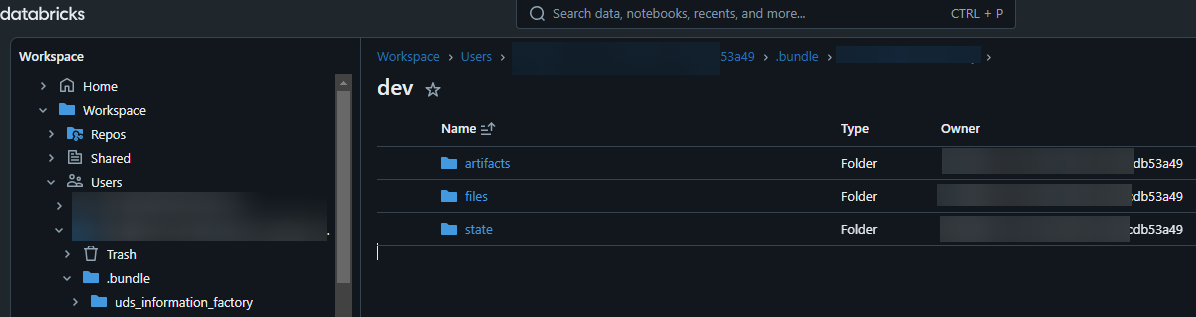
During this verification process, we learned how the sync behavior works in more depth. We also discovered the ᴅᴀᴛᴀʙʀɪᴄᴋꜱ ʙᴜɴᴅʟᴇ ꜱᴜᴍᴍᴀʀʏ command and the ᴅᴀᴛᴀʙʀɪᴄᴋꜱ ʙᴜɴᴅʟᴇ ꜱʏɴᴄ command. Every trial leads to inspecting the tool a bit further and further. That brings us to the hardest lesson of all.
Lesson 3 - There are “limitations”
It was a hair scratcher for all of us (and I think it still is). Databricks havetheir limitations. One of those limitationsis specifically related to the REST API.
If you’re using DABs, you can’t see what’s happening underneath. Expect when you turn on the lovely --ᴅᴇʙᴜɢ switch. The --ᴅᴇʙᴜɢ switch reveals the logic the CLI has implemented. And yes, I could have guessed it at first already, that when invoking ʙᴜɴᴅʟᴇ ᴅᴇᴘʟᴏʏ, it makes REST API calls.
In the beginning, it didn’t really hit any limitation. But as the story unfolded with the two lessons learned already, you can already see it coming. Testing things locally showed us no API rate limits. That’sobvious now, because only created, modified, and deleted files are synced after theirinitial sync. When we kept adding files that required to be imported into the workspace, it started to crumble. We first started with 100 files, then 500, eventually reaching an astonishing 2000+ files(you can question the design of the repository, which we are currently doing). Files varied between simply 5KB till 800KB+.
That brought us to the official documentation on Databricks. Here’s a picture of the table on API rest limits:
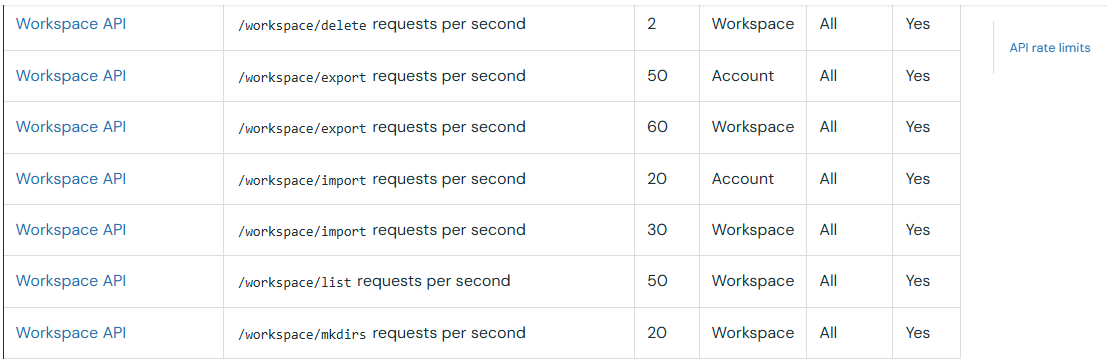
Every time we ran this through the DevOps pipeline, it attempts to import the file. We were constantly hit with either a 429 HTTP error (Resource Exhausted) or 504 (Gateway Timeout).
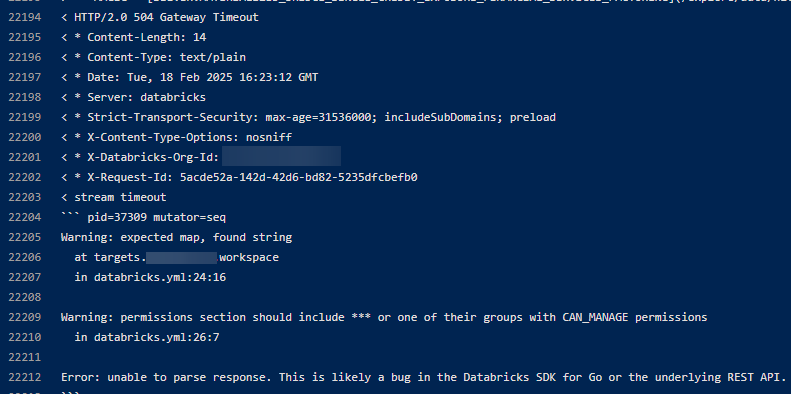
A valuable lesson when you start working with DABs. Even the CLI is cleverly built and has retry logic, API rate limits are there for a reason. It ensures high quality of service and fair usage under heavy load conditions. Having many files to be uploaded, bangs on that limit.
If you’re designing your repository to leverage DAB functionality, keep this in mind.
Acknowledgements
I can’t stress the fact enough to share my special thanks to my colleague Max van Wilsum for the amount of tries we run the Databricks CLI. Thanks for the time and effort you’ve put in.